Free photogrammetry software, tools that turn images into 3D models using structure-from-motion algorithms, is capable enough in 2026 for professional drone mapping, public safety documentation, and engineering surveys. The confusing part is not whether these tools are free; most genuinely are. It's that they split into two very different technical categories: cloud or mobile tools that run with no dedicated hardware, and desktop tools that need an Nvidia CUDA GPU to be usable at all. This guide ranks 8 free photogrammetry options in 2026, verifies each one's actual free-tier limits and current pricing on the vendor's own site, and tells you upfront which ones need a GPU before you download anything.
Key Takeaways
- SkyeBrowse Freemium is the only free-tier option here that accepts raw drone video (.MP4, .MOV) directly, no frame extraction or photo conversion, and processes it in the cloud with no local GPU needed.
- Meshroom, COLMAP, and RealityCapture (now RealityScan) are the strongest desktop reconstruction tools for photo-based work, but all three need an Nvidia CUDA GPU for practical performance on real datasets.
- RealityCapture was rebranded RealityScan 2.0 after Epic Games acquired Capturing Reality; it stays free for individuals and companies under $1 million in annual revenue, with a paid subscription required above that threshold.
- KIRI Engine's free tier advertises unlimited scans and unlimited exports with no ads or paywalls on formats, a notably more generous baseline than most mobile scanning apps.
- The American Society for Photogrammetry and Remote Sensing (ASPRS) defines the accuracy standards that separate hobbyist output from survey-grade deliverables, a distinction that matters when a model becomes legal, insurance, or engineering evidence.
- For DJI drone users, SkyeBrowse Freemium also accepts .SRT telemetry logs for automatic georeferencing, skipping the ground control point (GCP) workflow required by most desktop tools.
Contents
- What is free photogrammetry software and how does it work?
- Which free photogrammetry tools are worth using in 2026?
- What are the free-plan limits for each tool?
- How do these tools compare on GPU needs and output?
- What does it cost to upgrade beyond the free tier?
- How did we evaluate these free photogrammetry tools?
- Which free tool fits your capture workflow?
- When does a free tier become a limitation?
- FAQ
What is free photogrammetry software and how does it work?
Photogrammetry software reconstructs 3D geometry by analyzing the parallax between overlapping images, a reality capture technique known as Structure from Motion (SfM). The software identifies matching keypoints across image pairs, triangulates their positions in space, and outputs a dense point cloud that becomes a textured mesh or orthomosaic. Free photogrammetry software applies these same algorithms at no cost, through open source licensing, a limited cloud free tier, or a revenue-gated free license.
Photogrammetry is the dominant reality capture technique. For a deeper explanation of how 3D reconstruction works and where it is applied, see the guide to photogrammetry, covering the full SfM pipeline, GSD calculations, and real-world accuracy benchmarks.
According to the American Society for Photogrammetry and Remote Sensing (ASPRS), photogrammetric accuracy is governed by ground sample distance (GSD), overlap percentage, and sensor calibration, regardless of whether the software is free or paid. A $0 tool running well-collected imagery with 75% frontal and 60% side overlap can produce survey-quality results.
Free tools differ mainly in five constraints: dataset size limits, GPU dependency, cloud versus local processing, input format (photos, video, or LiDAR), and export format support. Those five constraints, not the price tag, determine whether a given tool actually fits your drone workflow.
Which free photogrammetry tools are worth using in 2026?
Eight tools stand out as genuinely capable free photogrammetry options in 2026: SkyeBrowse Freemium, Meshroom, WebODM (OpenDroneMap), COLMAP, Regard3D, KIRI Engine, Polycam, and RealityCapture (now RealityScan). Each handles reconstruction differently, cloud versus desktop, video versus photos, GPU-bound versus GPU-free, so the right choice depends on your capture hardware and required output.
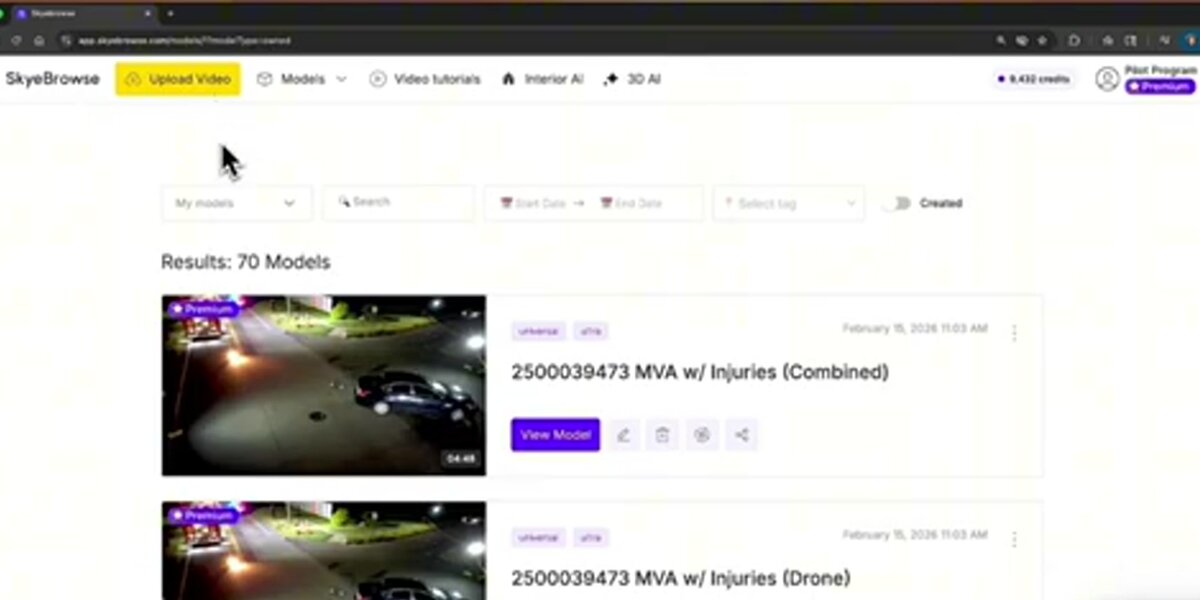
SkyeBrowse Freemium is the free tier of SkyeBrowse's cloud-based videogrammetry platform. Unlike every other tool on this list, SkyeBrowse accepts drone video files (.MP4, .MOV) directly, no frame extraction or photo conversion required, and reconstructs 3D models in the browser at app.skyebrowse.com. Freemium includes unlimited uploads, up to 2 concurrent models, and a 2GB file size cap, with basic tools (Draw, Distance, Annotate, Image Walkthroughs) but no export capability at this tier. It also doubles as one of the leading best photogrammetry apps for mobile-first professionals who need results in the field.
Meshroom, developed by the AliceVision consortium and available on GitHub, is a fully open source, node-based photogrammetry pipeline for Windows and Linux, released under the Mozilla Public License 2.0 (free for commercial use). It uses the AliceVision SfM engine and produces dense point clouds and textured meshes from photo sets, but requires an Nvidia CUDA-capable GPU; without one, the pipeline stalls at the depth map estimation stage. For a detailed head-to-head, see our SkyeBrowse vs Meshroom comparison.
WebODM / OpenDroneMap (ODM) is an open source command-line engine with a browser-based GUI. The ODM GitHub repository is MIT-licensed and handles georeferenced aerial datasets well, outputting orthomosaics, digital elevation models (DEMs), LAZ point clouds, and textured 3D meshes. Self-hosting is free indefinitely; WebODM Lightning, the hosted cloud version, gives new users 150 free processing credits before switching to paid usage.
COLMAP is a research-grade general-purpose SfM and multi-view stereo (MVS) pipeline released under the BSD license. The COLMAP GitHub repository is widely cited in academic photogrammetry literature and supports both pinhole and fisheye camera models. It excels at unstructured photo sets, images from arbitrary angles rather than systematic aerial grids, and benefits strongly from CUDA acceleration.
Regard3D is a free, open source SfM tool for Windows, macOS, and Linux. It has no GPU acceleration but compensates with a lightweight interface suited to smaller datasets, a practical choice when GPU hardware is unavailable and the dataset stays under a few hundred photos.
KIRI Engine is a mobile-first photogrammetry app (iOS, Android, web) that processes photo and LiDAR scans in the cloud. Its free tier advertises unlimited 3D scans and unlimited exports with no ads or paywalls gating the output, notably more generous than most competing mobile scanning apps. The Pro tier adds featureless object scanning, PBR material generation, and a higher per-upload photo limit.
Polycam is another mobile-first scanning app for iOS, Android, and web, combining LiDAR and photo-based capture. Its free plan is genuinely usable indefinitely but caps each model at 150 images and restricts export to the .gltf format, with public-only sharing links.
RealityCapture, now rebranded RealityScan 2.0 following Epic Games' acquisition of developer Capturing Reality, is a desktop photogrammetry tool for photos and laser scan data. It remains free for students, educators, and individuals or companies under $1 million in annual gross revenue, a genuinely unusual licensing model in this category, though it requires a capable GPU and a new End User License Agreement through the Epic Games ecosystem.
What are the free-plan limits for each tool?
Free-plan limits range from SkyeBrowse's unlimited upload count with a 2GB per-file cap, to Polycam's 150-image-per-model ceiling, to RealityCapture's unusual revenue-based eligibility threshold rather than a feature cap. GPU-dependent desktop tools like Meshroom, COLMAP, and RealityCapture technically have no dataset size limit in software, but are bottlenecked by whatever GPU you own.
Free-Plan Limits Comparison (as of July 2026)
| Tool | Free tier type | Cost | Dataset / upload limit | GPU required | Notes |
|---|---|---|---|---|---|
| SkyeBrowse Freemium | Permanent | $0 | Unlimited uploads, 2 concurrent models | No (cloud) | 2GB max file size per upload |
| Meshroom | Permanent (open source) | $0 | Unlimited, GPU-bound | Yes, Nvidia CUDA | Free for commercial use, MPL-2.0 license |
| WebODM / OpenDroneMap | Permanent (self-hosted) | $0 | Unlimited, hardware-bound | Recommended, not required | Docker or server needed to self-host |
| COLMAP | Permanent (open source) | $0 | Unlimited, GPU-bound | Strongly recommended | BSD license, research-grade |
| Regard3D | Permanent (open source) | $0 | Practically a few hundred photos | No | No GPU acceleration available |
| KIRI Engine | Permanent free tier | $0 | Unlimited scans, unlimited exports | No (cloud / mobile) | Pro tier raises the per-upload photo limit |
| Polycam | Permanent free tier | $0 | 150 images per model | No (cloud / mobile) | Export limited to .gltf |
| RealityCapture / RealityScan | Free under revenue threshold | $0 (under $1M annual revenue) | Not published | Yes, recommended | Paid subscription required above $1M revenue |
Sources verified directly on each vendor's site: SkyeBrowse pricing, Meshroom / AliceVision, WebODM, COLMAP, Regard3D, KIRI Engine pricing, Polycam pricing, and RealityScan.
How do these tools compare on GPU needs and output?
The clearest split among these eight tools is GPU dependency. Meshroom, COLMAP, and RealityCapture/RealityScan all need an Nvidia CUDA GPU (RealityScan has since added AMD GPU support) to process real-world datasets in a reasonable time. SkyeBrowse Freemium, WebODM, Regard3D, KIRI Engine, and Polycam all avoid a hard local GPU requirement, either by processing in the cloud or by running lighter CPU-only pipelines.
GPU and Output Comparison
| Tool | Input | Processing | Output | GPU dependency |
|---|---|---|---|---|
| SkyeBrowse Freemium | Drone video (.MP4, .MOV) | Cloud | 3D mesh (exports on paid tiers: LAZ, GLB, GeoTIFF) | None, cloud processing |
| Meshroom | Photos | Local desktop | Point cloud, textured mesh | Required (Nvidia CUDA) |
| WebODM / OpenDroneMap | Aerial photos | Local / self-hosted | Orthomosaic (GeoTIFF), LAZ point cloud, DEM, mesh | Recommended, not required |
| COLMAP | Photos, any orientation | Local desktop | Sparse and dense point cloud, camera poses | Strongly recommended |
| Regard3D | Photos | Local desktop (CPU) | Point cloud, textured mesh | None |
| KIRI Engine | Photos, LiDAR (mobile) | Cloud + on-device | 3D mesh export, unlimited on free tier | None |
| Polycam | Photos, LiDAR (mobile) | Cloud + on-device | 3D mesh (.gltf on free tier) | None |
| RealityCapture / RealityScan | Photos, laser scans | Local desktop | 3D mesh, point cloud | Required, GPU-accelerated |
This table is also a rough map of setup friction. Cloud and mobile tools (SkyeBrowse, KIRI Engine, Polycam) get you from capture to output the fastest with the least hardware investment. Desktop GPU tools (Meshroom, COLMAP, RealityCapture/RealityScan) demand more setup but generally give you finer control over the reconstruction pipeline and support larger, higher-resolution datasets once the hardware is in place. See our orthomosaic vs 3D model guide for which output type actually fits your project.
What does it cost to upgrade beyond the free tier?
Upgrade pricing spans from SkyeBrowse's pay-per-model unlocks starting around $3, to RealityCapture/RealityScan's revenue-gated subscription that only applies once a company crosses $1 million in annual revenue. KIRI Engine and Polycam sit closest together, both offering low monthly consumer-priced Pro tiers.
Upgrade-Path Pricing (as of July 2026)
| Tool | Entry paid tier | Price | What it unlocks |
|---|---|---|---|
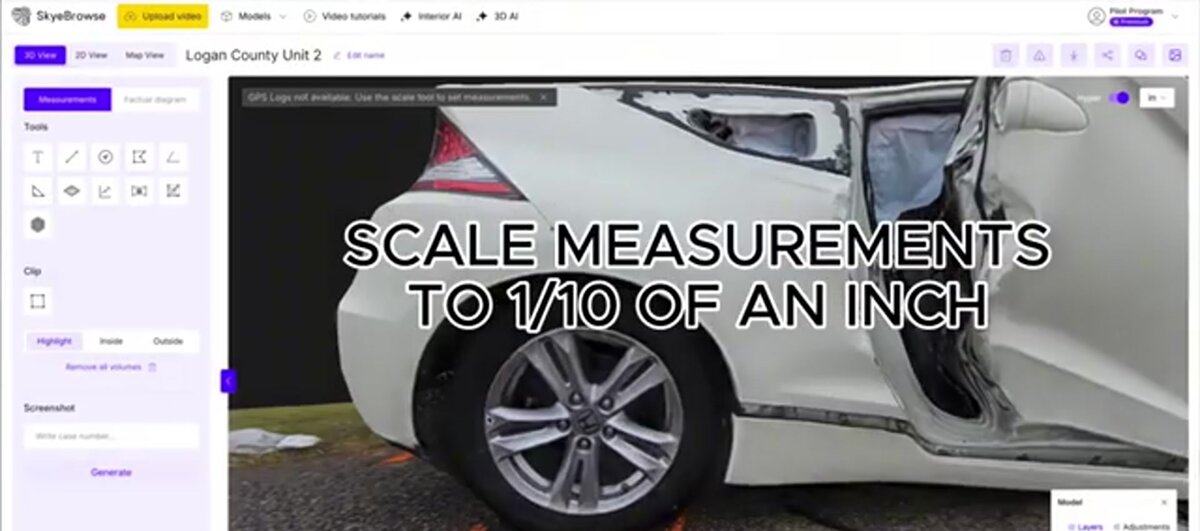
| SkyeBrowse | Pay-per-model, or Lite subscription | From $3/model; Lite $59/month or $468/year | Exports (LAZ, GLB, GeoTIFF), higher accuracy (approximately 2-6 inch), measurement tools |
| Meshroom | N/A | Free for all use, including commercial | No paid tier exists |
| WebODM / OpenDroneMap | WebODM Lightning (hosted) | 150 free credits for new users, then paid | Cloud processing without managing your own server |
| COLMAP | N/A | Free for all use | No paid tier exists |
| Regard3D | N/A | Free for all use | No paid tier exists |
| KIRI Engine | Pro | $17.99/month or $79.99/year | Featureless object scan, PBR materials, higher upload limits, priority queue |
| Polycam | Basic | $30/month or $150/year | Unlimited object and space captures |
| RealityCapture / RealityScan | Enterprise subscription | Priced through Epic Games licensing, required above $1M revenue | Continued use above the free revenue threshold |
Every figure above was pulled directly from the vendor's own pricing page in July 2026. Meshroom, COLMAP, and Regard3D have no paid tier at all; their entire value proposition is permanent, unrestricted open source access, which is worth weighing against the GPU hardware investment they require. RealityCapture/RealityScan's pricing structure is unusual enough that budget-conscious teams near the $1 million revenue line should confirm their exact status directly with the vendor before relying on the free tier long-term.
How did we evaluate these free photogrammetry tools?
We evaluated each tool against five criteria: free-tier type (permanent, revenue-gated, or capped), dataset and upload limits, GPU dependency, supported input and output formats, and current verified pricing. For SkyeBrowse, claims come from our own platform and kb.md-sourced pricing. For every third-party tool, claims come from the vendor's own published documentation, GitHub repositories, and pricing pages, not from hands-on testing.
We did not run controlled benchmark datasets through Meshroom, WebODM, COLMAP, Regard3D, KIRI Engine, Polycam, or RealityCapture/RealityScan for this guide, and we make no comparative claims about processing speed or reconstruction accuracy for those tools beyond what each vendor documents. Where a vendor publishes a specific accuracy figure, such as OpenDroneMap's documented capability to reach sub-5-centimeter accuracy with proper GCP placement, we cite the source directly rather than restating it as our own finding. This is also why GPU dependency claims in the tables above come from each project's own documentation (Meshroom's AliceVision engine, COLMAP's dense reconstruction stage, RealityScan's GPU acceleration notes) rather than internal testing. Because vendor pricing and licensing terms shift, especially RealityCapture's unusual revenue-based eligibility, the pricing tables carry an explicit "as of" date rather than an implied permanent figure.
Which free tool fits your capture workflow?
The best free photogrammetry workflow depends on what you're capturing and with what hardware. For drone video, SkyeBrowse Freemium provides the shortest path: upload the file and an optional telemetry log, and get a shareable 3D model within minutes, no frame extraction, no GCP placement, no desktop software. For drone photo sets, WebODM reads GPS EXIF data directly and produces georeferenced output without extra GCPs on flat terrain. For object or small-scene scanning from a phone, KIRI Engine or Polycam skip both desktop software and GPU hardware entirely.
For photo-shooting drones (DJI Mavic, Phantom, Air series shooting in photo mode), the recommended free workflow is to fly a grid mission with at least 75% frontal and 65% side overlap, the ASPRS minimum for mapping-grade output, export images with GPS EXIF intact, and process in WebODM or upload to SkyeBrowse Freemium if the same flight also captured video.
For video-shooting drones, or any operator capturing continuous footage rather than stills, SkyeBrowse Freemium removes the manual frame-extraction step entirely. It accepts the raw .MP4 or .MOV file, pairs it with a .SRT telemetry log (generated automatically by DJI drones) for georeferencing, and handles all reconstruction on cloud infrastructure. This video-first approach makes it a practical fit for time-limited operations: insurance inspections, public safety response, construction progress documentation. For a broader comparison of paid and free tiers across the drone mapping category, see the free drone mapping software roundup.
For object scanning, heritage documentation, or research, desktop GPU tools remain the strongest choice once the hardware is available. Meshroom and COLMAP handle controlled, ground-based capture of objects and structures well, while RealityCapture/RealityScan adds laser scan input alongside photos for teams that already own LiDAR hardware.
When does a free tier become a limitation?
Free photogrammetry tools become limiting when accuracy, dataset size, compliance, export flexibility, or GPU hardware requirements exceed what the free tier can deliver. Polycam's 150-image cap, Meshroom and COLMAP's GPU dependency, and RealityCapture/RealityScan's revenue-based eligibility are the most common walls practitioners hit.
For public safety and legal applications, accuracy is the defining constraint. ASPRS standards require documented error metrics and calibrated workflows. SkyeBrowse Freemium is built for scene documentation and preliminary work rather than certified measurement; the platform's Premium tier delivers sub-inch accuracy (approximately 0.25 inch at 8K resolution) using the same upload workflow, so teams can move from free evaluation to paid production without switching tools.
For large-scale surveying, WebODM/OpenDroneMap scales to thousands of images and supports ground control points for sub-5-centimeter accuracy, but large local datasets can require significant RAM and processing time; WebODM Lightning's cloud option reintroduces a usage cost after the initial free credits run out.
For developers and researchers, COLMAP remains the standard open source SfM baseline, but it lacks report generation, annotation, and sharing tools; turning it into a field-ready workflow takes additional engineering. And for any team approaching $1 million in annual revenue, RealityCapture/RealityScan's free eligibility is worth monitoring closely, since crossing that threshold triggers a required subscription regardless of how the software is actually used.
A broader overview of both free and paid reconstruction platforms, including Pix4D, DroneDeploy, and Agisoft Metashape, is available in the best photogrammetry software roundup. If your primary need is 2D mapping rather than 3D reconstruction, the free drone mapping software guide covers orthomosaic-focused tools in detail.

FAQ
What is the best free photogrammetry software for beginners?
SkyeBrowse Freemium, KIRI Engine, and Polycam are the most beginner-accessible options because none require command-line setup or a dedicated GPU. SkyeBrowse Freemium requires only a drone video file and a browser. KIRI Engine and Polycam both run from a mobile app with cloud processing, so a phone or tablet is enough to get a first model.
Can I run photogrammetry software without a GPU?
Yes. SkyeBrowse Freemium runs entirely in the cloud at app.skyebrowse.com, so no local GPU is needed. Regard3D, KIRI Engine, and Polycam also operate without a dedicated GPU. Meshroom, COLMAP, and RealityCapture/RealityScan all require an Nvidia CUDA GPU (RealityScan now also supports AMD GPUs) for practical throughput; attempting to run them on CPU-only hardware with more than a few dozen images results in processing times measured in hours or days.
What is the difference between photogrammetry software and drone mapping software?
Drone mapping software typically covers flight planning and 2D orthomosaic generation, the workflow of collecting and stitching aerial images into a georeferenced map. Photogrammetry software focuses on the 3D reconstruction step: converting overlapping images or video frames into point clouds and textured meshes using structure-from-motion algorithms. Many modern platforms, including SkyeBrowse, handle both in a single tool, while open source options like WebODM are strong at 2D aerial mapping and COLMAP or Meshroom specialize in 3D reconstruction.
Is open source photogrammetry software accurate enough for professional use?
It can be. WebODM/OpenDroneMap with properly placed ground control points can achieve horizontal accuracy below 5 centimeters, meeting many surveying and engineering standards. COLMAP is used in published academic research and professional photogrammetry workflows. The accuracy ceiling for free tools is largely determined by capture quality, image overlap, GSD, and camera calibration, rather than the software itself. For legally sensitive applications such as accident reconstruction or insurance claims, a documented, validated platform like SkyeBrowse Premium provides the accuracy tier and audit trail that professional standards require.
Is RealityCapture still free?
RealityCapture was rebranded RealityScan 2.0 after Epic Games acquired developer Capturing Reality. It remains free for students, educators, and individuals or companies with annual gross revenue below $1 million USD. Organizations above that revenue threshold need a paid subscription, and existing RealityCapture Enterprise license holders from before April 2024 retain download access to older versions at no additional cost.