Free drone mapping software splits into two groups that buyers mix up constantly: tools that stay free indefinitely, and time-limited trials of paid platforms. Treating a 14-day trial like a permanent free tier is the most common mistake in this category, and it wastes real field time. This guide checks what SkyeBrowse Freemium, WebODM/OpenDroneMap, DroneDeploy, Pix4D, DJI Terra, GeoNadir and Polycam actually include at no cost in 2026, places eight tools by the job each one does best, and walks a beginner from first flight to first map without spending a dollar. Every competitor price was re-checked on the vendor's own site in October 2026. For the wider picture of methods, flight planning and ground control, see our drone mapping guide.
Key Takeaways
- Four tools stay usable indefinitely at $0: SkyeBrowse Freemium, WebODM/OpenDroneMap (self-hosted), GeoNadir Essentials and Polycam Free. DroneDeploy, Pix4D and DJI Terra offer time-limited trials only.
- SkyeBrowse Freemium builds 3D models straight from drone or phone video, with unlimited uploads, 2 concurrent models and a 2GB cap per upload; most models are ready within minutes.
- Verified paid entry points as of October 2026: DJI Terra Standard $1,850/year or $5,280 perpetual, PIX4Dmatic Analyst $2,290/year, DroneDeploy Flight & Analysis $4,188/year, Agisoft Metashape Standard $179 one time.
- SkyeBrowse paid models start at $24.99, and eligible Freemium organizations get their first full model for $5 with every Pro tool and export.
- A first map needs only a drone or phone, a steady flight pattern and a free account. Any commercial use in the US also needs an FAA Part 107 certificate.
Contents
- What is free drone mapping software and how does the free tier work?
- What is the best drone mapping software for each use case?
- Which free drone mapping tools are worth trying in 2026?
- What are the free-plan limits for each tool?
- How do these tools compare on features and output?
- What does it cost to upgrade beyond the free tier?
- What do you need to start drone mapping for free?
- How do you make your first drone map for free, step by step?
- What mistakes should beginners avoid?
- How did we evaluate these drone mapping tools?
- What are the real limits of free drone mapping software?
- FAQ
What is free drone mapping software and how does the free tier work?
Free drone mapping software turns aerial photos or video into maps and 3D models at no cost, either indefinitely or for a trial window. SkyeBrowse Freemium, WebODM/OpenDroneMap, GeoNadir Essentials and Polycam Free stay free with usage caps. DroneDeploy, Pix4D and DJI Terra are paid platforms with 14-day, 15-day and one-month trials. Know which group a tool sits in before you invest hours in it.
That distinction shapes the whole buying decision. A permanently free tool like SkyeBrowse Freemium gives you repeatable output at $0 for as long as you use it, with higher resolution, exports and longer storage on paid models. A time-limited trial like DJI Terra's one-month window gives you a professional desktop tool, but the clock starts at activation and specific caps (500 photos, 8GB of LiDAR data) apply even during the trial.
The USGS National Land Imaging Program documents how drone survey data supports scientific and government mapping, the same discipline every tool here serves. Most of these platforms use photogrammetry, extracting depth and geometry from hundreds of overlapping still photos. SkyeBrowse uses videogrammetry: it processes frames from one continuous video, so a short orbit or grid video replaces a photo-grid mission and processing runs at roughly one minute per minute of footage.
The practical breakdown:
- Permanently free tools: SkyeBrowse Freemium, WebODM/OpenDroneMap (self-hosted), GeoNadir Essentials, Polycam Free
- Time-limited free trials: DroneDeploy (14 days), Pix4D (15 days), DJI Terra (1 month, with in-trial caps), Agisoft Metashape (30 days, plus a demo mode with saving and export blocked)
What is the best drone mapping software for each use case?
The best drone mapping software depends on the deliverable and the capture method. SkyeBrowse leads for video-based 3D models in minutes and public safety scenes, WebODM for open-source control, DroneDeploy for enterprise construction and agriculture fleets, PIX4Dmatic for large photo surveys, DJI Terra for DJI LiDAR payloads, Agisoft Metashape for low-cost desktop photogrammetry, GeoNadir for environmental research and Polycam for phone object scans.
Best Drone Mapping Software by Use Case (as of October 2026)
| Tool | Best for | Capture input | Free option | Paid entry price |
|---|---|---|---|---|
| SkyeBrowse | Fast 3D models from video, public safety and accident scenes, teams without GCP workflows | Video from any drone, phone or 360 camera | Freemium (permanent) | $24.99 per model; first model $5 for eligible Freemium orgs |
| WebODM / OpenDroneMap | Open-source, self-hosted photo mapping with full control | Photos | Free software (self-hosted) | Hosted WebODM Lightning plans are paid |
| DroneDeploy | Enterprise construction and agriculture fleets with automated flights | Photos | 14-day trial | $4,188/year (Flight & Analysis); Ag Lite $1,908/year |
| PIX4Dmatic | Large photo datasets, terrain and CAD-ready survey deliverables on desktop | Photos, LiDAR | 15-day trial | $2,290/year (Analyst) |
| DJI Terra | DJI owners processing Zenmuse LiDAR and photo missions on a workstation | Photos, LiDAR | 1-month trial | $1,850/year or $5,280 perpetual (Standard) |
| Agisoft Metashape | Low-cost desktop photogrammetry for researchers and hobbyists | Photos | 30-day trial, demo mode | $179 one time (Standard); $3,499 (Professional) |
| GeoNadir | Environmental research, ecology and Sentinel-2 overlays | Photos | Essentials (permanent) | $84/month (Professional) |
| Polycam | Phone-based object and room scans | Photos, phone LiDAR | Free plan (permanent) | $30/month or $150/year (Basic) |
SkyeBrowse is the pick when speed and simplicity decide the job. You fly an automated orbit or grid with the SkyeBrowse Flight App on supported DJI and Autel aircraft, or upload video from any drone, phone or 360 camera, and the cloud returns a measurable 3D model in minutes. Paid Commercial and Pro models process at 8K with 0.5 inch accuracy, and Public Safety & Enterprise reaches 0.1 inch at 16K, all without ground control points. Accuracy scales with capture distance, so flying closer or walking a phone next to an object gets you survey-grade detail. In an independent accuracy study by AirBorne Works, SkyeBrowse video models came closest to Leica BLK360 laser-scan ground truth on 8 of 9 measurements, outperforming photo-based Pix4D Mapper and Leica BLK3D. Police, fire and accident reconstruction teams use it for scenes that can't wait for a photo-grid mission.
WebODM / OpenDroneMap suits users who want open-source software and are comfortable running Docker or a GPU workstation. You own the compute, storage and troubleshooting, and you get orthomosaics, point clouds, DEMs and textured meshes in return. Our WebODM review covers setup time and total cost in detail.
DroneDeploy fits organizations that standardize on one platform across many pilots, with flight automation, live map features and integrations aimed at construction and agriculture. It is the most expensive entry point on this list for an individual pilot. See our DroneDeploy review for the full plan breakdown.
PIX4Dmatic handles large photo and LiDAR datasets on a desktop and adds terrain and CAD workflows on its Analyst plan. Our DJI Terra vs Pix4D comparison goes deeper on both.
DJI Terra makes the most sense if you already fly a DJI enterprise aircraft with a Zenmuse LiDAR or mapping camera and want processing from the same vendor on a Windows workstation.
Agisoft Metashape is the lowest one-time cost for desktop photogrammetry. Standard is the low-cost edition, and Professional adds the advanced survey and GIS toolset. Our Pix4D vs Metashape guide compares the two desktop options.
GeoNadir and Polycam round out the list: GeoNadir for research teams that want free cloud orthomosaics with satellite context, and Polycam for quick object and room captures on a phone (Polycam review).
Which free drone mapping tools are worth trying in 2026?
Seven free drone mapping tools are worth evaluating in 2026: SkyeBrowse Freemium, WebODM/OpenDroneMap, GeoNadir Essentials and Polycam Free stay free, while DroneDeploy, Pix4D and DJI Terra offer trials of paid products. Pick a permanent tool to learn and to run small jobs, and use a trial only when you are close to buying.
| Tool | Free tier type | Best free use | Key constraint |
|---|---|---|---|
| SkyeBrowse Freemium | Permanent | Browser-based 3D models from video, no install | Basic resolution, no exports, 30-day archive |
| WebODM / OpenDroneMap | Permanent (self-hosted) | Open-source aerial photo mapping | Docker or server required, your hardware sets the limits |
| GeoNadir Essentials | Permanent | Researchers, GIS teams, satellite overlay | 500 images per dataset, 1 project for analysis |
| Polycam Free | Permanent | Phone object and space scanning | 150 images per capture, .gltf export only |
| DroneDeploy | 14-day trial | Evaluating an enterprise platform | No permanent free tier; plans start at $1,908/year |
| Pix4D | 15-day trial | Evaluating desktop photogrammetry | No permanent free tier; PIX4Dreact from $55/month |
| DJI Terra | 1-month trial | DJI hardware owners evaluating LiDAR or photogrammetry | 500-photo and 8GB LiDAR cap during trial |
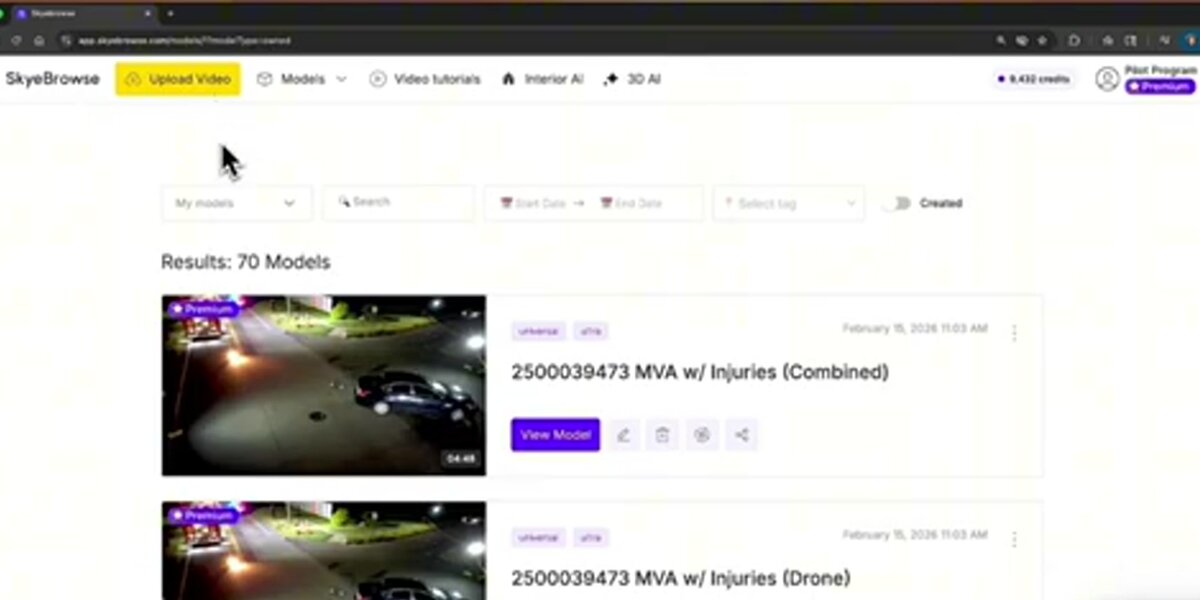
SkyeBrowse Freemium includes unlimited uploads, up to 2 concurrent models, a 2GB file cap per upload and the basic viewer tools: Draw, Distance measurement, Annotate and Image Walkthroughs. Exports start on paid models. Full plan detail is on the SkyeBrowse pricing page.
What are the free-plan limits for each tool?
Free-plan limits range from SkyeBrowse's unlimited uploads with a 2GB per-file cap, to GeoNadir's 100GB storage with 500 images per dataset, to DJI Terra's 500-photo and 8GB LiDAR ceiling during a one-month trial. The table lists each limit as published on the vendor's own pricing or trial page.
Free-Plan Limits Comparison (as of October 2026)
| Tool | Free tier type | Cost | Upload / image cap | Storage or file-size cap | Time limit |
|---|---|---|---|---|---|
| SkyeBrowse Freemium | Permanent | $0 | Unlimited uploads, 2 concurrent models | 2GB max file size per upload | None (30-day model archive) |
| WebODM / OpenDroneMap | Permanent (self-hosted) | $0 | Bound by your own hardware | Bound by your own storage | None |
| GeoNadir Essentials | Permanent | $0 | 500 images per dataset | 100GB processing and storage | None |
| Polycam Free | Permanent | $0 | 150 images per capture | Not published | None |
| DroneDeploy | Trial only | $0 for 14 days | Not published for trial | N/A | 14 days, no credit card required |
| Pix4D | Trial only | $0 for 15 days | Not published for trial | N/A | 15 days, no credit card required |
| DJI Terra | Trial only | $0 for 1 month | 500 photos, 8GB LiDAR data | One computer per activation | 1 month; activate within 3 days of receiving the code |
Sources checked on each vendor's site in October 2026: SkyeBrowse pricing, WebODM, GeoNadir pricing, Polycam pricing, DroneDeploy pricing, Pix4D pricing and DJI Terra.
How do these tools compare on features and output?
The clearest feature split is cloud versus local processing. SkyeBrowse, GeoNadir and Polycam process on the vendor's infrastructure, so nothing runs on your machine. WebODM, DJI Terra and Metashape depend on your own workstation or server. DroneDeploy and Pix4D sit in between, with cloud or desktop options depending on the product.
Feature and Output Comparison
| Tool | Input | Cloud or local | Orthomosaic | 3D model | Exports | GCPs required |
|---|---|---|---|---|---|---|
| SkyeBrowse | Video (.MP4, .MOV, .INSV, .OSV) | Cloud | Yes (top-down view) | Yes | Pro models: LAZ, GLB, OBJ, USDZ, GeoTIFF | No |
| WebODM / OpenDroneMap | Photos | Local / self-hosted | Yes | Yes | GeoTIFF, LAZ, OBJ, DEM | Recommended for absolute accuracy |
| GeoNadir Essentials | Photos | Cloud | Yes (RGB) | No | View and share | No |
| Polycam Free | Photos, phone LiDAR | Cloud / on-device | No | Yes | .gltf only | No |
| DroneDeploy | Photos | Cloud | Yes | Yes (higher tiers) | Varies by plan | Recommended |
| Pix4D | Photos, LiDAR | Local or cloud | Yes | Yes | Varies by product | Recommended |
| DJI Terra | Photos, LiDAR | Local (Windows) | Yes | Yes | Varies by license | Recommended for survey work |
Each of these turns raw aerial captures into deliverables. Our orthomosaic vs 3D model guide explains which output fits which project. One note for SkyeBrowse: it outputs a surface model and point cloud, so bare-earth DTMs and vector linework come from processing the LAZ export in GIS or CAD software. The broader truth in this table: free rarely means complete. Formal survey deliverables, team collaboration and compliance-ready exports eventually push every user past a free tier or trial.
What does it cost to upgrade beyond the free tier?
Upgrade pricing runs from SkyeBrowse's $5 first model and $24.99 per-model pricing up to DroneDeploy's $4,188 per year Flight & Analysis plan. DJI Terra Standard costs $1,850 per year or $5,280 perpetual on the US DJI Store, PIX4Dmatic Analyst is $2,290 per year, and Agisoft Metashape Standard is a $179 one-time license.
Upgrade-Path Pricing (as of October 2026)
| Tool | Entry paid tier | Price | What it adds |
|---|---|---|---|
| SkyeBrowse | Commercial or Pro model | $5 first model for eligible Freemium orgs; Commercial $24.99/model ($19.99 annual), Pro $49.99/model ($39.99 annual) | 8K processing at 0.5 inch accuracy, up to 3 videos per model, 5 users; Pro adds exports, AI Floor Plan and Site Plan, 1-year storage |
| WebODM / OpenDroneMap | WebODM Lightning (hosted) | Paid cloud plans (see webodm.net) | Cloud processing without running your own server |
| GeoNadir | Professional | $84/month | 1TB storage, 3,000 images per dataset, thermal orthomosaics, NDVI, up to 5 users |
| Polycam | Basic | $30/month or $150/year | 300 images per capture, unlimited object captures, mesh and point cloud exports |
| DroneDeploy | Ag Lite or Flight & Analysis | $1,908/year (Ag Lite); $4,188/year (Flight & Analysis) | Mapping, live map features, support |
| Pix4D | PIX4Dreact or PIX4Dmatic Analyst | From $55/month (PIX4Dreact); $2,290/year (PIX4Dmatic Analyst) | Rapid 2D mapping (react); terrain, CAD and vectorization workflows (matic) |
| DJI Terra | Standard | $1,850/year or $5,280 perpetual (Flagship $3,700/year or $10,580 perpetual) | Full photogrammetry and LiDAR reconstruction without trial caps |
| Agisoft Metashape | Standard or Professional | $179 or $3,499 one time (node-locked) | Desktop photogrammetry; Professional adds advanced survey and GIS tools |
SkyeBrowse figures come from our pricing page; every other figure was read on the vendor's own pricing or store page in October 2026 (DroneDeploy, PIX4Dmatic, DJI Store, Agisoft, GeoNadir, Polycam). The SkyeBrowse $5 offer can be applied to an existing Freemium model, which is then rebuilt at full resolution with no re-flight, and it includes every Pro tool and export with 90-day storage. Paid models keep the same video-first drone 3D mapping workflow as Freemium. Subscription prices change often, so recheck before you budget, especially where custom quotes apply.
What do you need to start drone mapping for free?
To make a first drone map for free you need a drone or any camera that records video, charged batteries, a safe open site and a free account at app.skyebrowse.com. A desktop GPU, survey-grade GPS receiver or specialized mapping drone is optional for a first project. Commercial work in the US also requires an FAA Part 107 certificate.
What equipment do you need?
SkyeBrowse Universal Upload accepts video from DJI, Autel, Skydio and Parrot drones flown manually, plus smartphones, GoPros and 360 cameras, so you can start with gear you already own. On DJI and Autel aircraft, turn on subtitle recording and upload the .SRT (DJI) or .ASS (Autel) file with your video: it carries GPS and altitude data that georeferences the finished model. If you fly a supported aircraft such as the DJI Mini 4 Pro, Matrice 4E/4T or M30T with the required controller, the SkyeBrowse Flight App can fly the mission for you. The supported drones list shows which modes each aircraft gets. Before flying, run through a drone preflight checklist.
Do you need a license to map with a drone?
In the United States, flying purely for fun falls under the recreational rules, which require passing The Recreational UAS Safety Test and registering any drone over 250 grams. The moment a map serves a business purpose, even an informal landscaping quote or roof estimate for a client, you need an FAA Part 107 Remote Pilot Certificate, which means passing the aeronautical knowledge test at an FAA-approved testing center. Flights near airports or in controlled airspace need authorization, usually through LAANC. Outside the US, check your national aviation authority.
How do you make your first drone map for free, step by step?
A first free drone map takes four steps: choose a capture method, fly a steady orbit or grid, upload the video at app.skyebrowse.com, and review the model once cloud processing finishes. Processing runs at roughly one minute per minute of video, so most first-time users go from takeoff to a finished 3D model in well under an hour.
Step 1, choose your capture method. On a supported aircraft, open the SkyeBrowse Flight App and pick SkyeBrowse mode (an automated two-orbit flight for scenes under about an acre) or WideBrowse (an automated grid for larger areas). On any other drone or a phone, record a video yourself and use Universal Upload.
Step 2, fly a steady pattern. Orbit a building, grid a field, and keep speed, distance and altitude constant. Move around the subject instead of panning in place, keep zoom locked, and finish with some overlap where you started.
Step 3, upload your footage. Log in at app.skyebrowse.com, choose Upload, name the project and attach the video plus its .SRT or .ASS file if you have one. Processing starts in the cloud right away, with nothing to install.
Step 4, review and share. The model appears in your dashboard when processing finishes. On Freemium you can view it, measure distances, draw and annotate, and you can repeat the cycle as often as you like. Video walk-throughs for specific drones and scenes are on the SkyeBrowse tutorials page.

What mistakes should beginners avoid?
The most common beginner mistakes are erratic flight paths, sudden altitude changes, poor lighting and pointing the camera at surfaces with no texture. Each one starves the reconstruction of matching detail between frames, whichever software you use. A slow, steady orbit or grid in even light fixes most failed first models.
Erratic movement causes the most failed first attempts. When the aircraft turns sharply or yaws quickly, consecutive frames stop overlapping enough to stitch. A consistent pass at steady speed gives the algorithm the overlap it needs, which matters more than an expensive camera.
Lighting and surfaces come next. Harsh midday sun creates hard shadows, and glass, water, mirrors and blank walls give the software little to match. Fly in overcast light or near golden hour, avoid filling the frame with sky, and move closer for more detail per frame. The ASPRS Positional Accuracy Standards explain why controlled overlap and capture conditions underpin accurate geospatial data, and the same principles apply to a first practice flight. When you are ready for certified absolute coordinates, read our ground control points guide.
How did we evaluate these drone mapping tools?
We scored each tool on five criteria: free-tier type, upload or dataset limits, input and output formats, setup effort (cloud versus local hardware) and current verified pricing. SkyeBrowse claims come from our own platform and pricing page. Every third-party claim comes from that vendor's published documentation and pricing, read in October 2026.
We did not run controlled benchmark datasets through DroneDeploy, Pix4D, DJI Terra, WebODM, Agisoft Metashape, GeoNadir or Polycam for this guide, and we make no claims about their processing speed or output beyond what each vendor documents. Where a vendor publishes a capability (such as OpenDroneMap's documented results with ground control points), we cite the vendor. Pricing tables carry an explicit "as of" date because subscription pricing drifts, and we re-verify them each quarter.
What are the real limits of free drone mapping software?
Most free drone mapping tools can make a map. Their real limits are processing resolution, dataset size, export formats, collaboration and how long you can use them before a trial ends or a free tier caps out. Those limits matter once jobs become regular, time-sensitive or shared with a team.
The useful question is whether a free tool can reliably make the map you need, at the pace you need, for as long as you need it. The answer varies by stage:
- Learning and experimentation: any of the tools here works
- Occasional small projects: SkyeBrowse Freemium, GeoNadir Essentials or Polycam Free usually cover it long-term
- Evaluating a purchase: DroneDeploy, Pix4D, DJI Terra and Metashape trials give you the real product while the clock runs
- Repeat commercial mapping: at $24.99 per Commercial model, SkyeBrowse costs less than one $1,850 DJI Terra Standard year until about 74 models
- Formal surveying or regulated work: documented accuracy, chain of custody and process discipline matter more than which tool is free
For the paid market in depth, see the drone mapping software guide, our 3D mapping software comparison and the best photogrammetry software roundup.

FAQ
What is the best free drone mapping software?
It depends on whether you need a tool that stays free or a trial of a paid platform. SkyeBrowse Freemium is the fastest no-install option and works from drone video, WebODM/OpenDroneMap is the best open-source option if you can run your own hardware, GeoNadir Essentials suits researchers, and Polycam Free suits phone-based object scans. DroneDeploy, Pix4D, DJI Terra and Agisoft Metashape offer only time-limited trials or demo modes.
What is the best drone mapping software overall?
There is no single winner; the best drone mapping software depends on the job. SkyeBrowse fits video-first teams, public safety and anyone who wants 3D results in minutes without ground control points. DroneDeploy fits enterprise construction and agriculture fleets, PIX4Dmatic fits large photo-based survey datasets, DJI Terra fits DJI LiDAR owners, Agisoft Metashape fits budget desktop photogrammetry, and WebODM fits open-source users.
How much does drone mapping software cost?
As of October 2026: SkyeBrowse Commercial is $24.99 per model (first model $5 for eligible Freemium organizations), DJI Terra Standard is $1,850 per year or $5,280 perpetual on the US DJI Store, PIX4Dmatic Analyst is $2,290 per year, DroneDeploy Flight & Analysis is $4,188 per year, Agisoft Metashape Standard is a $179 one-time license, and GeoNadir Professional is $84 per month. WebODM is free and open source if you self-host.
Is DroneDeploy free?
No. DroneDeploy offers a 14-day free trial with no credit card required, but it has no permanent free plan. Its Flight & Analysis plan for individual pilots lists at $4,188 per year as of October 2026, and Ag Lite at $1,908 per year.
Do you need a license to make drone maps?
In the United States, mapping purely for fun generally needs only the recreational rules and The Recreational UAS Safety Test. Any business use, even an informal roof estimate or landscaping quote, requires an FAA Part 107 Remote Pilot Certificate. Check your local aviation authority outside the US.
Can you start drone mapping with a phone instead of a drone?
Yes. SkyeBrowse Universal Upload accepts MP4 and MOV video from smartphones, action cameras and drones, plus native Insta360 INSV and OSV files. A phone works well for small objects and interiors, and walking the camera close to the subject is how videogrammetry reaches its finest detail.
Which free drone mapping tool works without installing anything locally?
SkyeBrowse Freemium, GeoNadir and Polycam all run in the cloud or on a phone, so no desktop installation is needed. WebODM needs local or self-hosted server infrastructure. DJI Terra and Agisoft Metashape run on a desktop workstation.
Upload your first video free. Create a free SkyeBrowse account, upload a drone or phone video, and get a 3D model processed in the cloud. Freemium organizations that have never had a paid plan can get their first full model for $5 (normally $24.99), with every Pro tool, every export and 90-day storage.