Photogrammetry software converts overlapping photographs or drone video into measurable 3D models and 2D maps, and by 2026 the category spans desktop research tools, enterprise cloud platforms, drone-specific apps, and mobile scanning apps. Choosing the right photogrammetry software means matching input type (photos vs. video), processing environment (cloud vs. desktop), accuracy tier, and price to the job at hand. This guide compares seven leading platforms, Pix4D, DroneDeploy, Agisoft Metashape, RealityCapture, 3DF Zephyr, OpenDroneMap, and SkyeBrowse, side by side so you can make that call in minutes.
Already know which slice of the market you need? Jump straight to the option that matches your budget or hardware: our guide to free photogrammetry software covers the no-cost tools, best photogrammetry app covers mobile-first capture, and drone photogrammetry software covers dedicated drone mapping platforms. The comparison below spans the full category, desktop, cloud, drone, and mobile, in one place.
Key Takeaways
- This comparison spans the full photogrammetry software category, desktop research tools, enterprise cloud platforms, drone-specific apps, and mobile scanning apps, not one narrow slice.
- Pix4D and DroneDeploy are the strongest all-around platforms for large-scale survey and construction workflows requiring ground control point (GCP) precision.
- Agisoft Metashape remains the top choice for research and offline processing where maximum accuracy and full algorithmic control are required.
- SkyeBrowse is the only videogrammetry platform in this comparison: it accepts drone video instead of photos, cutting field capture time and delivering a model in minutes, a workflow built for public safety and rapid-response teams where speed-to-model matters more than sub-centimeter accuracy.
- Free options are viable for limited projects: OpenDroneMap (self-hosted, unlimited) and 3DF Zephyr Free (up to 50 photos) are the strongest no-cost entries, alongside SkyeBrowse's free tier for basic video uploads.
Contents
- What is the best photogrammetry software?
- What is photogrammetry software and how does it work?
- How do the top platforms compare?
- Which photogrammetry software is best for drones?
- What is the best free photogrammetry software?
- How does SkyeBrowse differ from traditional photogrammetry tools?
- FAQ
What is the best photogrammetry software?
Photogrammetry software selection depends on your use case and workflow: no single platform wins every metric. For large-scale survey and construction projects requiring ground control point precision, Pix4D and DroneDeploy are the industry-leading choices. For research-grade desktop processing with maximum algorithmic control, Agisoft Metashape is unmatched. SkyeBrowse is the fastest option for public safety, insurance, and rapid-response teams: it accepts drone video rather than photos, producing a georeferenced 3D model in minutes without a desktop GPU.
The decision typically comes down to four variables: input type (photos vs. video), processing environment (cloud vs. desktop), required accuracy tier, and mission tempo. A highway crash investigator who needs a defensible 3D model before the road reopens has entirely different requirements from a geospatial engineer producing survey-grade deliverables for a land boundary dispute. Unlike guides that focus on a single slice of the market, this comparison covers desktop, cloud, drone, and mobile photogrammetry software side by side, because most buyers are choosing across categories, not just within one.
For teams new to aerial mapping, our overview of what is photogrammetry explains the underlying science for those building a foundational understanding before committing to a platform. Buyers weighing tools beyond pure photogrammetry can also compare the broader 3D mapping software landscape, which spans surveying, construction, and reality-capture platforms alongside the drone-focused options here.
What is photogrammetry software and how does it work?
Photogrammetry software reconstructs 3D geometry from sets of overlapping 2D images using a computational technique called structure-from-motion (SfM). The software identifies matching features across hundreds or thousands of photos, calculates the position and orientation of each camera at the moment of capture, and builds a dense point cloud that is then converted into a textured 3D mesh or an orthomosaic, a geometrically corrected 2D map. Accuracy depends on image overlap, camera calibration, and the use of ground control points (GCPs).
The American Society for Photogrammetry and Remote Sensing (ASPRS) defines photogrammetric mapping accuracy standards in its Positional Accuracy Standards for Digital Geospatial Data, which set the benchmarks most professional survey workflows are designed to meet. The ASPRS Positional Accuracy Standards classify horizontal accuracy from Class I through Class III, giving project managers a framework for specifying deliverable requirements before selecting software.
Modern drone mapping software has made photogrammetric workflows accessible to non-surveyors. Platforms like DroneDeploy and Pix4D automate most of the SfM pipeline (flight planning, image alignment, and export) so operators without photogrammetry backgrounds can produce georeferenced outputs. The USGS 3D Elevation Program relies on similar lidar-and-photogrammetry hybrid workflows to maintain national elevation datasets, illustrating how deeply photogrammetry is now embedded in core infrastructure mapping.
How do the top platforms compare?
The seven major photogrammetry and videogrammetry platforms each occupy a distinct niche defined by input type, processing environment, accuracy ceiling, and price. Pix4D and DroneDeploy dominate enterprise drone workflows; Agisoft Metashape leads for offline research-grade accuracy; RealityCapture excels at speed for large datasets; OpenDroneMap and 3DF Zephyr cover the free and low-cost tier; and SkyeBrowse stands alone as a video-input platform built for speed and rapid deployment.
The table below summarizes the key decision variables across all seven platforms, spanning desktop, cloud, drone, and mobile options in a single view. Because this comparison spans every deployment model, check the Processing and Output Formats columns closely: a desktop GPU requirement or a missing export format can rule out a platform before price ever becomes the deciding factor.
| Platform | Price | Input Type | Processing | Output Formats | Accuracy | Best For | Free Tier |
|---|---|---|---|---|---|---|---|
| Pix4D | $350/mo (cloud) or $8,700 perpetual | Photos | Cloud or desktop | GeoTIFF, LAS/LAZ, OBJ, PDF report | Survey-grade with GCPs | Large-scale survey, agriculture, construction | No (trial only) |
| DroneDeploy | $499-999/mo | Photos | Cloud | GeoTIFF, LAS/LAZ, OBJ | High (GCP support) | Construction progress, enterprise AEC | No (trial only) |
| Agisoft Metashape | $179 standard / $3,499 pro | Photos | Desktop (GPU) | OBJ, PLY, LAS/LAZ, GeoTIFF | Highest, sub-cm with GCPs | Research, archaeology, forensics | 30-day trial |
| RealityCapture | $0.25/model credit (PPI) | Photos + laser | Desktop (GPU) | OBJ, PLY, LAS/LAZ, FBX | Survey-grade | Large datasets, VFX, cultural heritage | Free (output watermarked) |
| 3DF Zephyr | Free to $4,200 | Photos | Desktop | OBJ, PLY, LAS | High | Small to mid projects, education | Yes (50 photos) |
| OpenDroneMap | Free (self-hosted) | Photos | Self-hosted | GeoTIFF, LAS/LAZ, OBJ, MBTiles | Survey-grade | Budget-conscious, open-source workflows | Yes (unlimited) |
| SkyeBrowse | Free to $199/model credit ($59/mo Lite) | Video | Cloud | LAZ, GLB, GeoTIFF | 2-6 inch (Lite) to 0.1 inch (Premium Advanced) | Public safety, insurance, rapid response | Yes (basic) |

Which photogrammetry software is best for drones?
For drone-based photogrammetry, the best platform depends on output type and mission tempo. Pix4D offers the deepest integration with DJI enterprise hardware and supports the most rigorous GCP and oblique flight workflows. DroneDeploy provides the most polished end-to-end cloud experience for construction teams. SkyeBrowse is the fastest option for teams that want a 3D model within minutes of landing, by capturing video instead of individual stills, operators avoid the time-consuming photo sorting and alignment setup that other platforms require.
Pix4D's strength lies in its comprehensive flight-planning app (Pix4Dcapture) and deep integration with the entire SfM pipeline, from GCP placement through orthomosaic export. It handles oblique imagery well and supports multi-spectral inputs for agriculture use cases, a major differentiator. Its accuracy ceiling, when combined with RTK drone hardware and properly placed GCPs, can reach the Class I thresholds defined by ISO 19157 for geographic information data quality.
DroneDeploy's cloud-first model means no desktop GPU is required, and its progress-monitoring dashboards are purpose-built for construction project managers who want side-by-side comparison of site conditions across weeks or months. Its automated flight app covers most commercial DJI hardware natively.
For teams operating under time pressure (crash investigators, fire scene analysts, insurance adjusters reaching a loss site), neither platform's photo-based workflow is fast enough. That gap is where SkyeBrowse's video-input approach becomes decisive. Our overview of photogrammetry software for drones covers the free end of this category in depth for budget-constrained teams.
What is the best free photogrammetry software?
OpenDroneMap (ODM) is the most capable free photogrammetry option available. Self-hosted through its WebODM interface, it processes unlimited photos and produces point clouds, orthomosaics, and digital surface models with no per-model fees. 3DF Zephyr Free is the easiest free desktop option for beginners, capped at 50 source photos. RealityCapture's free tier removes watermarks only after purchasing credits, making it better described as pay-per-use rather than genuinely free.
For teams that want truly unlimited free drone mapping software without recurring fees, OpenDroneMap is the clear winner, but it requires a machine with a capable CPU or GPU and some comfort with self-hosted infrastructure. Docker-based deployment is well-documented, and the open-source community is active.
3DF Zephyr Free sits at the opposite end: a one-click Windows installer, no server configuration, and immediate access to a guided reconstruction wizard. The 50-photo ceiling limits it to small subjects (an individual building, a piece of equipment, or a crash vehicle), but for students, researchers testing workflows, or operators who only occasionally need 3D models, it costs nothing.
Agisoft Metashape's 30-day trial is fully functional, with no photo limit, making it the best option for a one-time project where you need professional accuracy without a long-term license commitment.
How does SkyeBrowse differ from traditional photogrammetry tools?
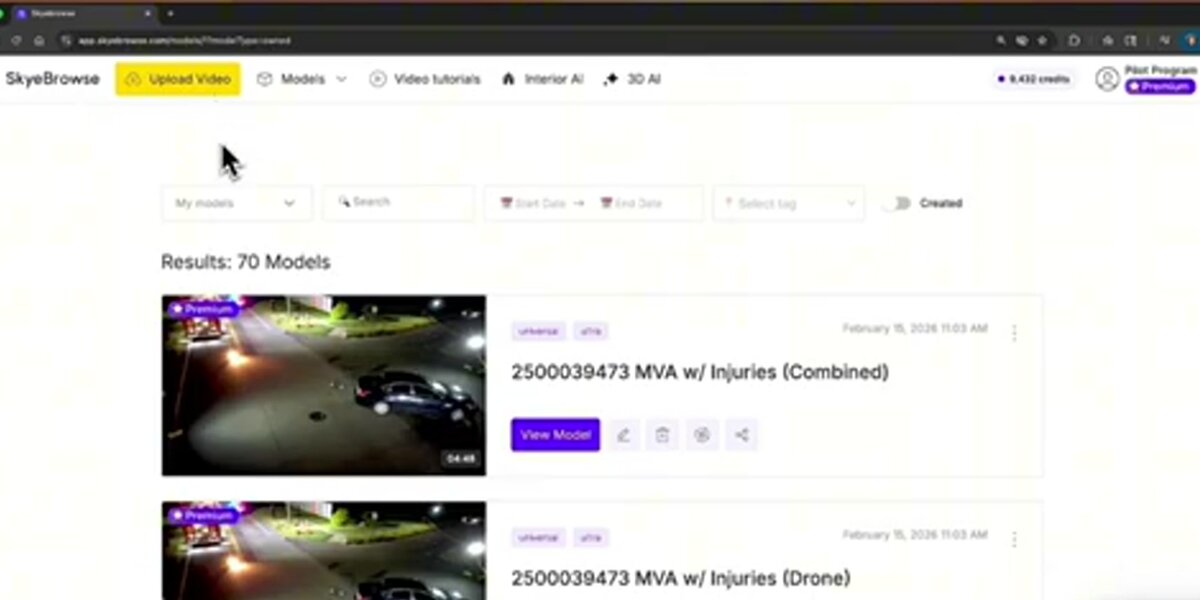
SkyeBrowse is a videogrammetry platform rather than a conventional photogrammetry tool. Instead of capturing, sorting, and aligning thousands of still images, operators fly a standard drone video pass over a scene, upload the .MP4 or .MOV file through a mobile app or browser, and receive a georeferenced 3D model and 2D orthomosaic in the cloud, typically within minutes. There is no GPU workstation required, no photo overlap calculation, and no image-by-image alignment to manage. This architecture is specifically designed for rapid-response use cases where a model must exist before the scene is cleared.
The distinction between photogrammetry and videogrammetry is more than a marketing label. Traditional SfM pipelines require operators to plan flight paths for optimal image overlap (typically 75-85% frontal, 60-70% side), export and organize hundreds to thousands of JPEG files, and run alignment passes that can take hours on consumer hardware. SkyeBrowse's cloud processing engine pulls frames directly from video at consistent intervals, handles telemetry pairing with .SRT (DJI) or .ASS (Autel) subtitle files for georeferencing, and queues models automatically.
Accuracy tiers at SkyeBrowse scale with processing tier, and because videogrammetry accuracy scales with capture distance, flying closer or walking a phone camera next to the object of interest reaches survey-grade results at every tier: Lite produces models accurate to approximately 2-6 inches, suitable for scene documentation and spatial orientation; Premium (8K processing) reaches approximately 0.25 inch; and Premium Advanced (16K with AI moving-object removal) achieves approximately 0.1 inch. Pricing scales the same way: Freemium is free for basic uploads, Lite runs $59 a month (or $468 a year), and Premium and Premium Advanced are priced per model credit at $99 and $199. Models export as LAZ point clouds, GLB 3D meshes, and GeoTIFF orthomosaics, the same format ecosystem used by traditional platforms.
More than 1,200 public safety agencies use SkyeBrowse for crash reconstruction, crime scene documentation, and fire investigation. The differentiator is speed: a defensible, measurable 3D model exists before the crew leaves the scene, built on the same survey-grade accuracy tiers described above. For a deeper look at how SkyeBrowse stacks up against specific competitors, see the head-to-head comparisons with RealityCapture and OpenDroneMap.
FAQ
What is the best photogrammetry software?
The best photogrammetry software depends on your priorities. For survey-grade accuracy with drone photos, Pix4D and DroneDeploy are the industry standards. For research and maximum desktop control, Agisoft Metashape leads. For rapid model generation from drone video (no desktop GPU, no photo management), SkyeBrowse is the fastest option. For zero cost, OpenDroneMap (self-hosted) gives you unlimited processing with no license fees.
What is the best free photogrammetry software?
OpenDroneMap (via WebODM) is the most capable free and open-source photogrammetry option, supporting full orthomosaic and point cloud outputs with no photo limit. 3DF Zephyr Free handles up to 50 photos at no cost with a simple desktop installer. Agisoft Metashape offers a fully functional 30-day trial. For cloud-based use, SkyeBrowse offers a free basic tier for video uploads. See our full breakdown of free drone mapping software options.
What is the difference between photogrammetry and videogrammetry?
Photogrammetry reconstructs 3D geometry by aligning overlapping still photographs using structure-from-motion algorithms. Videogrammetry, the approach used by SkyeBrowse, extracts frames directly from drone video, skipping the photo capture and file management steps. This typically cuts field time significantly and allows cloud processing to begin immediately after landing. Photo-based workflows still achieve higher maximum accuracy for survey-grade deliverables when combined with RTK hardware and GCPs.
Which photogrammetry software is best for drones?
The answer depends on use case. Pix4D and DroneDeploy lead for large-scale survey and construction requiring precise GCP workflows and multi-mission progress tracking. Agisoft Metashape is the preferred desktop choice for research, archaeology, and maximum accuracy. SkyeBrowse is the fastest option for public safety and rapid-response teams that capture video rather than photos. OpenDroneMap is the best free self-hosted alternative for budget-conscious operators.
What is the best photogrammetry software for beginners?
For beginners, cloud-based platforms are the easiest entry point. DroneDeploy and SkyeBrowse both offer guided upload workflows with no manual alignment or desktop configuration required: upload a file, receive a model. 3DF Zephyr Free is the simplest no-cost desktop option with a guided reconstruction wizard. Agisoft Metashape has a steeper learning curve but provides the most control as your skills advance. Most platforms offer free trials or tiered pricing, so testing before committing to a subscription is straightforward.
Is photogrammetry software hard to learn?
Cloud platforms like DroneDeploy and SkyeBrowse are designed for non-specialists and require minimal technical knowledge: upload a file, receive a model. Desktop tools like Agisoft Metashape have a steeper learning curve but offer more control over every processing parameter. OpenDroneMap requires comfort with command-line or Docker environments. Most platforms offer free tutorials; the ASPRS also publishes educational resources on photogrammetric methods for practitioners who want a deeper technical foundation.