The DJI Matrice 350 RTK is one of the most capable enterprise drones on the market, built for demanding survey, inspection, and mapping missions. But DJI Matrice 350 RTK mapping software is where raw flight data becomes actionable deliverables — and not all platforms match the hardware's capability. This guide covers the M350's key specs, how processing software determines final accuracy, and why cloud-based videogrammetry (the use of video frames to reconstruct geometry in 3D, in contrast to traditional still-image photogrammetry) closes the gap between field capture and finished output. For context on the full range of aerial data collection methods, see our aerial mapping guide.
Key Takeaways
- The DJI Matrice 350 RTK pairs RTK positioning with a multi-payload bay and IP55 weather resistance, making it purpose-built for enterprise survey environments.
- The M350 RTK's 55-minute flight time captures extensive sites in a single sortie, and SkyeBrowse processes the full video in equivalent time — no dedicated workstation hardware required.
- SkyeBrowse accepts M350 MP4 video plus SRT telemetry files directly, using the embedded RTK geolocation data to georeference models automatically.
- The ASPRS Positional Accuracy Standards define accuracy tiers from Class I to Class III; RTK-equipped drone data processed with centimeter-accurate telemetry can meet Class I horizontal requirements for many mapping applications.
- SkyeBrowse's Premium Advanced tier reaches 0.1-inch accuracy using 16K processing and AI-based moving-object removal, making it a viable pipeline for high-precision enterprise deliverables.
Contents
- What makes the DJI Matrice 350 RTK an enterprise-grade mapping platform?
- Why does processing software determine final mapping accuracy?
- How does desktop photogrammetry compare to cloud videogrammetry for the M350?
- How does SkyeBrowse handle DJI Matrice 350 RTK video and telemetry?
- What output formats and accuracy tiers does SkyeBrowse deliver?
- FAQ
What makes the DJI Matrice 350 RTK an enterprise-grade mapping platform?
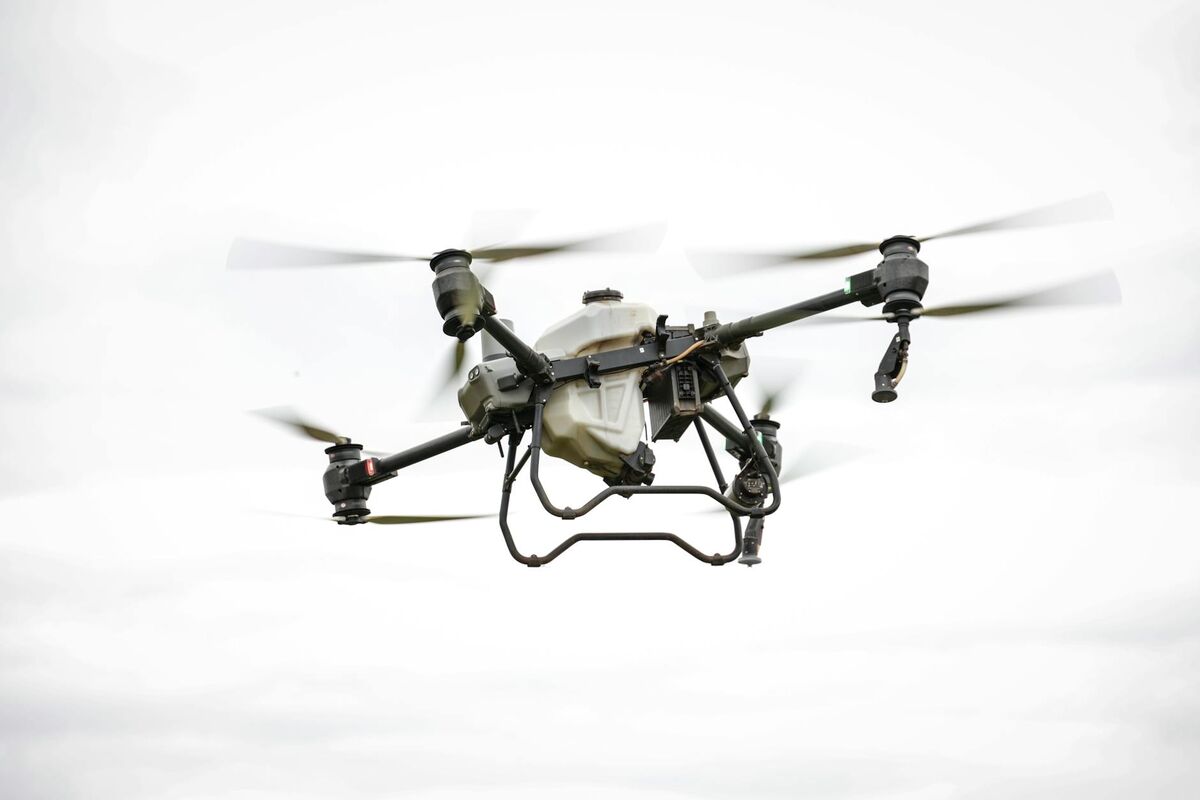
The DJI Matrice 350 RTK combines an onboard RTK (Real-Time Kinematic) GPS module — which uses a correction signal from a base station or network to achieve centimeter-level positioning — with a triple-payload mounting system and an IP55-rated airframe. This combination gives enterprise operators a drone that can fly in light rain, carry multiple sensors simultaneously, and tag every frame or video segment with centimeter-accurate coordinates.
The M350 supports DJI's Zenmuse payload ecosystem, including the P1 photogrammetry camera (45 MP, mechanical shutter), the L2 LiDAR unit, and the H20T thermal-optical sensor. For mapping missions, the P1 remains the primary still-image payload, while teams that need fast, on-demand 3D documentation often fly standard video with the built-in or secondary camera. The drone's 55-minute maximum flight time on a dual-battery setup allows it to cover substantially larger areas per sortie than consumer-class hardware.
The RTK module provides real-time positional corrections that are embedded in the footage or image metadata as the aircraft flies. According to the American Society for Photogrammetry and Remote Sensing (ASPRS Positional Accuracy Standards), achieving Class I horizontal accuracy (RMSE ≤ 3.75 cm at the 1:100 scale) requires precise geolocation at the image or frame level — a requirement the M350 RTK is engineered to meet when paired with a compatible base station or NTRIP correction service.
For a broader look at how RTK positioning affects survey workflow, see our drone surveying guide. For teams considering how the Matrice 350 RTK compares to traditional survey instruments for scene documentation, the total station vs drone mapping comparison covers cost, accuracy, and coverage differences in depth.
Why does processing software determine final mapping accuracy?
Even with centimeter-accurate RTK positioning embedded in the flight data, the final map or model is only as accurate as the software that reconstructs it. Processing software controls how frames are matched, how point clouds are computed, and how positional metadata is weighted during bundle adjustment — the mathematical step that aligns all captures into a coherent coordinate system. A weak software pipeline can degrade RTK-quality input data by several centimeters or more.
Bundle adjustment is the core processing step in photogrammetry: the software solves for the position and orientation of every capture simultaneously, minimizing the overall reprojection error across all overlapping frames or images. When RTK telemetry is properly ingested and weighted, the bundle adjustment anchors the model in real-world coordinates without requiring manually surveyed ground control points (GCPs) at every site. The USGS 3D Elevation Program (3DEP Lidar Base Specification) similarly emphasizes that point accuracy is a combined product of sensor positioning and processing methodology.
GCPs remain valuable for independent accuracy verification and for projects where correction signal coverage is intermittent. Our ground control points guide covers when GCPs add the most value even on RTK-equipped drone missions, including the minimum number needed for check-point validation.
The choice of software also determines throughput. Enterprise operators flying the M350 on multiple daily sorties cannot afford a processing pipeline that requires a $5,000 workstation and overnight render queues. This is where the cloud vs. desktop distinction becomes operationally significant.
How does desktop photogrammetry compare to cloud videogrammetry for the M350?
Desktop photogrammetry tools — such as Pix4D, Agisoft Metashape, and RealityCapture — process still images from the M350's P1 camera into dense point clouds and orthomosaics, but require a high-end local workstation (typically 64 GB RAM, RTX-class GPU) and processing times that range from 30 minutes for small projects to 8 or more hours for large-area surveys. Cloud videogrammetry platforms like SkyeBrowse ingest the M350's continuous video footage instead and perform all reconstruction on remote servers, returning finished outputs in a fraction of the time without any local compute requirement.
The bottleneck in desktop photogrammetry is the dense image matching step, which scales quadratically with image count. A 1,000-image P1 dataset can generate 45,000 image pairs that the software must evaluate simultaneously. Even on high-end hardware, this step alone can consume multiple hours of GPU time. Enterprise teams running multiple flights per day face a processing queue that can fall days behind if a project surge occurs.
Cloud videogrammetry sidesteps this constraint by shifting compute to scalable server infrastructure. The M350's onboard video camera captures continuous footage at high frame rates, and platforms like SkyeBrowse sample that video into overlapping frames server-side, perform photogrammetric reconstruction in the cloud, and return LAZ point clouds, GLB 3D meshes, and GeoTIFF orthomosaics — all without occupying the operator's local machine.
For teams evaluating the broader landscape of processing options, our drone mapping software guide compares photogrammetry, LiDAR, and videogrammetry pipelines across cost, speed, and accuracy dimensions.
How does SkyeBrowse handle DJI Matrice 350 RTK video and telemetry?
SkyeBrowse accepts MP4 or MOV video files from the DJI Matrice 350 RTK alongside the DJI-standard SRT telemetry file, which contains per-frame GPS coordinates, altitude, gimbal angles, and — when RTK is active — centimeter-accurate positional data. The platform uses this SRT data during bundle adjustment to anchor the 3D reconstruction without requiring manual GCP entry, making it possible to go from landed drone to processed model in under an hour.
The workflow is straightforward: fly the M350 with video recording enabled, land, and upload the M350 RTK video with its .SRT telemetry file for maximum georeferencing precision — the platform reads DJI's embedded RTK coordinates automatically at app.skyebrowse.com. The platform queues the job, runs photogrammetric reconstruction on AWS servers, and notifies the operator when the model is ready for review in the browser-based viewer.

This cloud workflow is especially valuable for field teams operating across multiple sites, where returning to a desktop machine between missions is impractical. The M350's IP55 rating means it can fly in conditions that might otherwise scrub a photogrammetry session — light rain, dusty environments, high-humidity coastal sites — and SkyeBrowse's cloud backend handles the resulting footage just as efficiently as fair-weather captures.
SkyeBrowse supports the M350 alongside more than 100 other drone models. For comparison, see how a similar cloud workflow functions with a compact enterprise drone in our DJI Mavic 3E mapping setup guide. Enterprise survey teams should also review the best drone mapping software for surveyors guide for a broader look at platforms across professional survey use cases.
What output formats and accuracy tiers does SkyeBrowse deliver?
SkyeBrowse produces three primary deliverable formats: LAZ (compressed LiDAR-compatible point cloud), GLB (3D mesh for browser and CAD viewing), and GeoTIFF (georeferenced orthomosaic). The M350 RTK's centimeter-level positioning feeds directly into Premium Advanced processing, achieving 0.1-inch model accuracy without ground control points — with Lite (2–6 inch) and Premium (0.25 inch, 8K) tiers available for lower-priority sorties.
For matrice 350 RTK mapping missions where survey-grade deliverables are required — infrastructure inspections, construction progress documentation, forensic scene capture — the Premium or Premium Advanced tiers align best with the hardware's capability. At $99 per model credit for Premium and $199 for Premium Advanced, the per-project cost is predictable and does not require an annual software seat or dedicated processing hardware.
The GeoTIFF export is directly importable into ArcGIS, QGIS, AutoCAD Civil 3D, and other GIS and CAD platforms used by surveyors, engineers, and public works teams. The LAZ format is compatible with CloudCompare, Global Mapper, and any software accepting the ASPRS LAS specification. The GLB mesh can be embedded in reports or shared via browser-based link for stakeholder review without specialized software on the recipient's end.
Enterprise teams choosing the M350 RTK typically need enterprise-grade data governance — SkyeBrowse delivers AWS GovCloud hosting, CJIS compliance, and 5-year guaranteed retention. For teams that need enterprise pricing, multi-seat licensing, or additional data governance options, SkyeBrowse also offers organizational plans via skyebrowse.com/quote.

FAQ
What mapping software works with the DJI Matrice 350 RTK?
The DJI Matrice 350 RTK is compatible with both desktop photogrammetry tools like Pix4D and Agisoft Metashape and cloud-based platforms like SkyeBrowse. SkyeBrowse accepts the M350's MP4 video along with its SRT telemetry file for automatic georeferencing, producing 3D models and orthomosaics in the cloud without local processing hardware. See skyebrowse.com/supported-drones for the full compatibility list.
Can the DJI Matrice 350 RTK produce survey-grade accuracy without GCPs?
Yes. The M350's built-in RTK module provides centimeter-level positional accuracy that can reduce or eliminate the need for ground control points on many projects. Pairing RTK-tagged video with software that ingests SRT telemetry — such as SkyeBrowse — allows the platform to use the embedded geolocation data for accurate model placement. GCPs are still recommended as independent check points for projects requiring formal accuracy certification. Our ground control points guide covers check-point best practices in detail.
How long does it take to process a DJI Matrice 350 RTK flight in SkyeBrowse?
Processing time in SkyeBrowse depends on video length and the selected accuracy tier, but cloud rendering typically returns a complete 3D model or orthomosaic within minutes to an hour. Because processing happens on AWS servers rather than a local workstation, operators can submit flights from the field and receive results before returning to the office. Desktop photogrammetry pipelines processing the same data on local hardware can take 4 to 12 hours for large-area M350 surveys.