Polycam has built a reputation as one of the most accessible 3D scanning apps available on iOS. Point your phone at an object or a room, and within seconds you have a navigable 3D mesh. For casual users and creative professionals, that experience genuinely delivers. But for anyone approaching Polycam with professional requirements — survey-grade accuracy, outdoor scene coverage, compliance documentation, or integration with aerial workflows — the ceiling becomes apparent quickly. This review assesses what Polycam does well, where it falls short, and who should look elsewhere.
Key Takeaways
- Polycam is a fast, polished 3D scanning app for iPhone and iPad — genuinely impressive for small indoor spaces and object capture.
- LiDAR scanning is limited to Apple Pro-line devices (iPhone 12 Pro or later, iPad Pro 2020+) with a practical range of approximately 5 meters.
- No outdoor, aerial, or large-scale scene capability. No drone integration, no GCP support, no georeferencing.
- Accuracy is adequate for visualization but not for measurement, survey, forensics, or engineering — no published accuracy specifications.
- The free tier exports GLTF only; Polycam Pro now costs $26.99/month or $199.99/year through the App Store, and georeferenced exports require a Business plan at approximately $400/year per user.
- No CJIS compliance, no FedRAMP, no chain-of-custody logging — not suitable for law enforcement or evidentiary use.
Polycam at a Glance
| Category | Details |
|---|---|
| What It Is | 3D scanning and photogrammetry app for iPhone and iPad |
| Best For | Real estate walkthroughs, small product captures, interior visualization, creative projects |
| Capture Modes | LiDAR mode (Apple Pro devices only) and Photo mode (broader device support) |
| Processing | On-device (phone CPU/memory is the bottleneck) |
| Pricing | Free tier (GLTF export only). Pro: $26.99/month or $199.99/year (App Store). Business: approximately $400/year per user. Enterprise: custom. |
| Accuracy | Adequate for visualization. No published specs, no GCP support, no RTK integration. |
| Compliance | None. No CJIS, no FedRAMP, no chain-of-custody, no audit logging. |
| Key Limitation | Indoor/object-scale only, consumer-grade accuracy, Apple LiDAR dependency, no professional compliance |
Contents
- What is Polycam?
- How well does Polycam's LiDAR scanning work?
- Can Polycam handle large or outdoor scenes?
- How accurate is Polycam for professional use?
- Is Polycam free?
- How much does Polycam cost?
- Is Polycam suitable for public safety or forensic work?
- Who should use Polycam?
- Alternatives Worth Considering
What is Polycam?
Polycam is a 3D scanning and photogrammetry application built primarily for iPhone and iPad. It offers two core capture modes: LiDAR mode, which uses Apple's hardware depth sensor for near-instant mesh generation, and Photo mode, which reconstructs geometry from a series of overlapping still photographs using standard photogrammetry techniques.
LiDAR — Light Detection and Ranging — is a sensor technology that measures distances by firing laser pulses and recording their return time, producing dense point clouds in real time. Apple introduced LiDAR sensors to select iPad Pro models in 2020 and later to iPhone 12 Pro and newer Pro-line devices. Polycam's LiDAR mode leverages this hardware to generate mesh models on-device in seconds rather than minutes.
Photo mode broadens Polycam's reach to devices without a LiDAR sensor, including older iPhones and some Android hardware, though Android support remains limited and less polished than the iOS experience. Exports cover a wide range of formats: OBJ, FBX, USDZ, GLB, STL, PLY, and several others — a genuine strength for downstream use in 3D tools and game engines.
How well does Polycam's LiDAR scanning work?
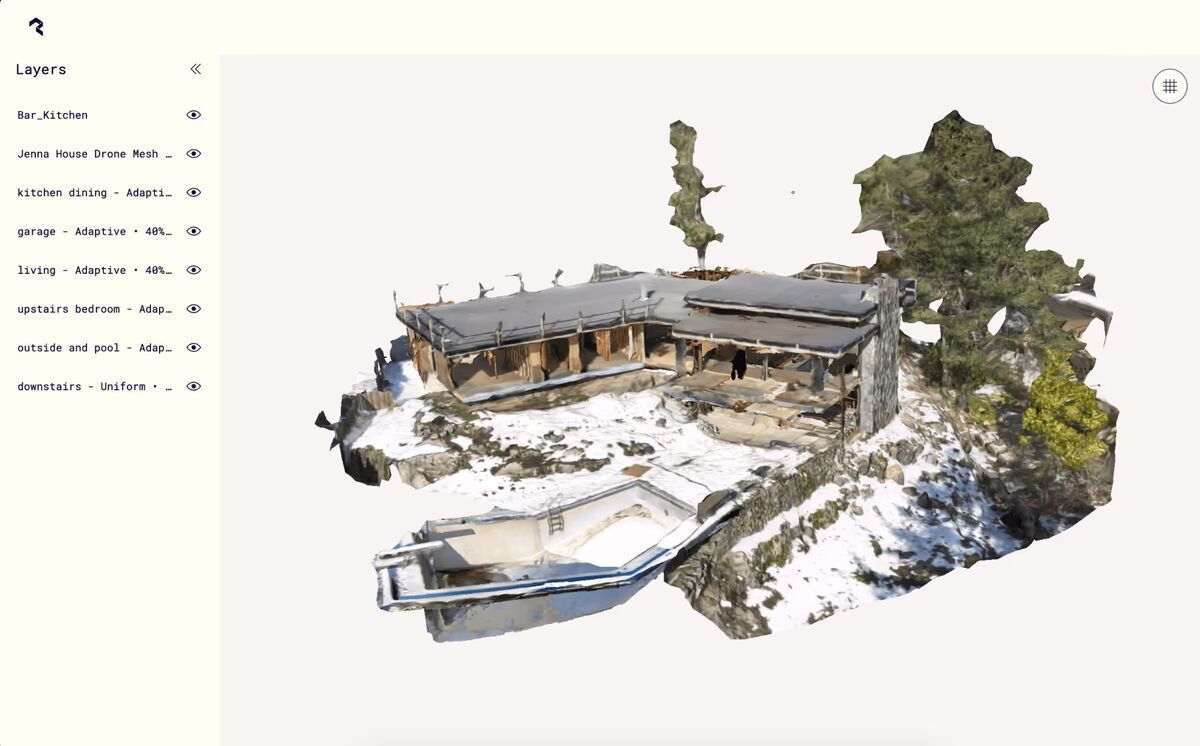
For small, bounded indoor spaces, LiDAR scanning in Polycam is genuinely impressive. A single room captures in under a minute, the mesh preview updates live on screen, and the resulting model is immediately shareable via Polycam's web viewer — no desktop processing step required.
The experience shines in real estate walkthroughs, small product captures, and interior visualization, a workflow many agents pair with a guide on how to make a 360 virtual tour once the scan is ready to share. Architects and designers have used it productively for quick spatial reference, and the low barrier to entry makes it appealing for anyone who needs a rough digital twin of a modest space without specialized hardware.
The practical constraints are real, however. LiDAR mode is exclusive to Apple devices with the LiDAR sensor — currently the iPhone 12 Pro or later (Pro/Pro Max lines only) and iPad Pro 2020 or later. The iPhone SE, all standard iPhone models, and virtually all Android devices are excluded from the fast-capture workflow entirely. According to Apple's official LiDAR sensor specifications, the sensor has a practical operating range of approximately 5 meters, which places a hard physical ceiling on the depth and complexity of any single scan pass.
Mesh quality also degrades as the scan grows in size. A single room delivers usable results. Multi-room scans show compounding registration drift, surface gaps, and texture inconsistencies that require manual cleanup in external software. Processing occurs on-device, which means the phone's CPU and memory become the bottleneck — a constraint no software update can fully overcome.
Can Polycam handle large or outdoor scenes?
No. Polycam is not designed for large-scale or outdoor capture, and it does not pretend to be.
LiDAR mode is hardware-limited to roughly 5 meters of depth, making it unsuitable for exterior facades, open terrain, parking lots, crash scenes, or any environment wider than a modest indoor space. Photo mode can process larger collections of images in theory, but the app's on-device and cloud pipelines are calibrated for object- and room-scale inputs. There is no drone integration, no aerial capture workflow, and no support for ground control points (GCPs) or RTK correction to anchor outputs to real-world coordinate systems. Outdoor reality capture at property or site scale depends on exactly that kind of georeferencing, which is why drone-based platforms remain the standard once a scene grows past a single room.
For users who need to map an outdoor property boundary, document a roadway collision scene, survey an agricultural field, or capture an industrial complex, Polycam is not a viable tool. The application has no mechanism for these use cases, and attempting to force it produces results with no georeferencing and accuracy unsuitable for any professional purpose.

If your use case involves anything beyond interior spaces and small objects, this is the point at which Polycam exits the conversation.
How accurate is Polycam for professional use?
Polycam's accuracy is adequate for visualization but not for measurement, survey, forensics, or engineering.
The app does not publish specific accuracy specifications, which itself signals where the product is positioned. For professional mapping and survey work, the American Society for Photogrammetry and Remote Sensing (ASPRS) Positional Accuracy Standards for Digital Geospatial Data define horizontal accuracy thresholds starting at 3 cm RMSE for high-accuracy mapping products — a benchmark that requires calibrated cameras, GCP networks, or RTK-corrected positioning. Polycam supports none of these controls. There is no GCP input workflow, no RTK hardware integration, no camera calibration pipeline, and no accuracy reporting in outputs.
In practical terms, a room scan processed in Polycam may produce linear measurements within a few centimeters under ideal conditions, but there is no way to verify, certify, or control that accuracy — and it will not hold across larger scans or complex geometry. For any application where a measurement error of 5–10 cm or more has real consequences — insurance documentation, forensic reconstruction, structural assessment — Polycam should not be the capture tool.
Is Polycam free?
Polycam has a free tier, but it is limited in ways that matter quickly. Free accounts get a capped number of captures, exports are restricted to GLTF format only, and models can only be shared through public links. Any professional export format — OBJ, FBX, STL, PLY, LAS — requires a paid subscription.
The free tier is genuinely useful for evaluating the app: you can scan a room or an object, view the result in 3D, and share a link. For students and hobbyists who never need to move a model into other software, free may be enough.
The practical ceiling arrives the moment you need the model somewhere else. GLTF works for web viewers and some game engines, but CAD, GIS, and 3D printing workflows need the formats behind the paywall. Private sharing is also gated — on the free tier, anyone with the link can view your scan, which alone disqualifies it for client work with confidentiality expectations.
How much does Polycam cost?
Polycam Pro costs $26.99 per month or $199.99 per year when purchased through the App Store, with web pricing running around $150 per year billed annually. The Business plan costs approximately $400 per year per user, and Enterprise pricing is custom. Prices vary by platform and billing cycle.
| Plan | Price | What You Get |
|---|---|---|
| Free | $0 | Limited captures, GLTF export only, public link sharing |
| Pro | $26.99/month or $199.99/year (App Store); approximately $150/year billed annually on the web | Unlimited captures, 15+ export formats (OBJ, FBX, STL, PLY, LAS, DXF), private sharing |
| Business | Approximately $400/year per user | Floor plans, advanced measurement tools, shared team library, georeferenced point cloud exports, AI-generated reports |
| Enterprise | Custom | SSO, custom branding, admin controls, dedicated support |
Polycam's pricing has climbed steadily — Pro launched years ago under $100 per year and now sits at roughly double that, with the most professional capabilities (georeferenced exports, floor plans, measurement tools) moved up into the Business tier. Current prices are listed on Polycam's pricing page.
For a professional evaluating Polycam against purpose-built tools, the subscription cost is a secondary concern — the more significant issue is that paying does not address the accuracy, scale, or compliance gaps that limit the tool for serious work. Business adds georeferenced LAS export, but with no GCP workflow, no RTK integration, and no published accuracy specifications, the georeferencing inherits the same consumer-grade positioning as the scan itself.
The Business and Enterprise tiers add team administration features — SSO, shared libraries, custom branding — but no compliance certifications, audit logging, or chain-of-custody controls. Teams with security or legal requirements will still find no pathway to meet those requirements within Polycam's current product.
Is Polycam suitable for public safety or forensic work?
No. Polycam has no features designed for public safety, law enforcement, or forensic documentation.
There is no chain-of-custody logging, no compliance with CJIS Security Policy requirements, no FedRAMP authorization, and no evidentiary workflow. Scans processed on a consumer device and stored in a third-party cloud account do not meet the integrity and access-control requirements that forensic evidence demands. A Polycam model introduced into legal proceedings would face significant challenges under standards like the Daubert test, which requires that scientific evidence be based on a reliable methodology with known and controlled error rates — none of which Polycam provides.
For crash reconstruction, crime scene documentation, fire investigation, or any context where the spatial data may be used in court or administrative proceedings, Polycam is not an appropriate tool.
Polycam Pros and Cons
| Pros | Cons |
|---|---|
| Fast, intuitive LiDAR scanning for small spaces | LiDAR mode requires Apple Pro-line devices only |
| Live mesh preview during capture | 5-meter practical depth limit on LiDAR sensor |
| Wide export format support (OBJ, FBX, USDZ, GLB, STL, PLY) | No outdoor, aerial, or large-scale scene capability |
| Shareable web viewer — no desktop processing needed | Multi-room scans show compounding drift and surface gaps |
| Low barrier to entry with free tier | No published accuracy specifications |
| Strong for real estate and product photography workflows | No GCP, RTK, or georeferencing support |
| Clean, polished user interface | No CJIS, FedRAMP, or evidentiary workflow support |
| Pro pricing has roughly doubled; georeferenced exports require the Business tier |
What do users say about Polycam?
Polycam has earned strong ratings on the App Store (4.7/5 stars) and a loyal following among real estate agents, hobbyists, and creative professionals. Users consistently praise the speed and ease of LiDAR scanning — the ability to walk through a room and have a navigable 3D model in under a minute is the feature that drives most positive reviews.
The most common criticism from professional users is the accuracy ceiling. Architects and engineers who try to use Polycam for precise measurements report that the results are close enough for visual reference but not reliable enough for professional documentation. The gap between "looks right" and "measures right" is where Polycam's consumer-grade positioning becomes apparent.
Device exclusivity is another friction point. Users on standard iPhones or Android devices are limited to Photo mode, which is slower and produces lower-quality results than LiDAR scanning. The requirement for a $1,000+ Pro-line iPhone to access the best features narrows the practical audience.
Who should use Polycam?
Polycam is genuinely well-suited to a defined set of use cases, and within those use cases it performs well.
Good fit:
- Real estate agents and property managers who want quick, shareable interior walkthroughs
- E-commerce sellers and product designers capturing small objects for 3D previews
- Architects needing rough spatial reference models of existing interior spaces, though teams with recurring interior projects should compare it against dedicated interior mapping software
- Game developers and hobbyists capturing props and environments for creative projects
- Educators and students exploring photogrammetry and LiDAR concepts with a low-cost entry point
Poor fit:
- Surveyors, engineers, or GIS professionals who need georeferenced, accurate outputs
- Law enforcement, fire investigators, or forensic specialists
- Anyone needing outdoor, aerial, or large-scale scene coverage
- Organizations with data security, compliance, or chain-of-custody requirements
- Teams that need to integrate 3D capture with drone-based mapping workflows
The honest summary: Polycam is a consumer-grade tool with a polished interface and genuine utility for interior and object-scale capture. It is being evaluated by prosumers and small businesses as a cost-saving alternative to professional scanning — and for strictly visual deliverables in small spaces, it can serve that role. But it is not a professional survey or documentation instrument, and treating it as one introduces risk.
Alternatives Worth Considering
If Polycam fits your use case, it is worth trying — the free tier provides enough functionality to evaluate it for small-scale interior work.
If you need capabilities that Polycam cannot provide, consider tools designed for those specific requirements:
- Matterport — more polished interior scanning with dedicated hardware options and stronger enterprise integrations, though similarly limited to indoor environments.
- Pix4D or Agisoft Metashape — desktop photogrammetry platforms with GCP support and accuracy controls, suited for users who can manage longer processing workflows and want professional-grade outputs.
- SkyeBrowse — purpose-built for outdoor, aerial, and public safety documentation. SkyeBrowse processes drone video into georeferenced 3D models with survey-grade accuracy down to 0.1 inch on Public Safety & Enterprise and no GCPs required. It supports CJIS-compliant data handling on AWS GovCloud, integrates with drone hardware across multiple manufacturers, and delivers models usable for forensic and evidentiary purposes. SkyeBrowse is trusted by 1,200+ public safety agencies including San Bernardino County Fire, the Utah State Fire Marshal's Office, and the California Department of Justice. For any use case involving outdoor scenes, crash reconstruction, crime scene mapping, or compliance-sensitive documentation, SkyeBrowse addresses the gaps that Polycam cannot close. See the full SkyeBrowse vs Polycam comparison for a detailed feature breakdown.
Choosing between tools comes down to the scene scale, accuracy requirements, and downstream use of the data. Polycam earns its place for what it does. For everything beyond that boundary, the right tool is one built for the job.
Frequently Asked Questions
Is Polycam accurate enough for professional use?
For visual reference and rough spatial documentation, Polycam can be adequate in small indoor spaces. For measurement, survey, forensics, or engineering applications, it lacks the accuracy controls, GCP support, and published specifications that professional work requires.
Does Polycam work on Android?
Polycam has limited Android support through Photo mode only. LiDAR scanning — the fastest and most capable capture method — requires an Apple device with a LiDAR sensor (iPhone 12 Pro or later, iPad Pro 2020 or later).
Can Polycam scan outdoor scenes?
No. Polycam's LiDAR sensor has a practical range of approximately 5 meters, making it unsuitable for outdoor facades, open terrain, or any scene larger than a modest indoor space. There is no drone integration or aerial capture workflow.
Is Polycam suitable for law enforcement or forensic work?
No. Polycam has no chain-of-custody logging, no CJIS compliance, no FedRAMP authorization, and no evidentiary workflow. Scans processed on a consumer device do not meet the integrity and access-control requirements that forensic evidence demands.
How much does Polycam cost?
Polycam Pro costs $26.99 per month or $199.99 per year through the App Store, with web pricing around $150 per year billed annually. The Business plan runs approximately $400 per year per user and adds georeferenced exports, floor plans, and team libraries. Enterprise pricing is custom, but no tier adds compliance certifications or chain-of-custody controls.
Is Polycam free?
Yes, with real limits. The free tier caps capture counts, exports only to GLTF format, and shares models through public links only. Professional export formats and private sharing require a Pro subscription.
Upload your first video free. Create a free SkyeBrowse account, upload a drone video, and get a 3D model processed in the cloud. Freemium organizations that have never had a paid plan can get their first full Commercial model for $5 (normally $24.99), with every Pro tool and export included and 90-day storage.
Authority citations: Apple LiDAR sensor specifications (developer.apple.com); ASPRS Positional Accuracy Standards for Digital Geospatial Data, Edition 2 (2015); Daubert v. Merrell Dow Pharmaceuticals, Inc., 509 U.S. 579 (1993).