Pix4D has been the reference name in professional photogrammetry — the computational process of extracting 3D measurements and maps from overlapping photographs — for well over a decade. Swiss-built, academically rigorous, and trusted by surveyors and agronomists worldwide, it earned that reputation honestly. But the platform has also grown into six separate products with layered pricing, steep hardware requirements, and workflows that can take hours to complete. If you are evaluating Pix4D for the first time, or reconsidering a renewal, this review walks through what the software actually delivers, where it falls short, and who it is genuinely a good fit for.
Key Takeaways
- Pix4D is the industry standard in professional photogrammetry, with survey-grade accuracy achievable when flights and GCPs are properly configured.
- The product line is split across six separate tools (Mapper, Cloud, Matic, React, Fields, Survey), each licensed independently — confusing and expensive to assemble.
- Desktop processing in Pix4Dmapper runs 30 minutes to several hours depending on hardware, with large jobs running overnight.
- Total cost of ownership compounds fast: a perpetual Mapper license (approximately $4,990) plus Cloud subscriptions, a dedicated workstation, and training time can exceed $20,000 over three years.
- No CJIS compliance, no FedRAMP authorization, and no video input support — limiting for public safety and rapid-response use cases.
Pix4D at a Glance
| Category | Details |
|---|---|
| What It Is | Professional photogrammetry software suite for survey, agriculture, and mapping |
| Best For | Licensed surveyors, precision agriculture operators, and large infrastructure programs with dedicated GIS staff |
| Products | Six separate tools: Pix4Dmapper, Pix4Dcloud, Pix4Dmatic, Pix4Dreact, Pix4Dfields, Pix4Dsurvey |
| Processing | Desktop (hardware-dependent, 30 min to overnight) or Cloud ($300-500/month subscription) |
| Pricing | Mapper perpetual: approximately $4,990. Cloud: approximately $300-500/month. Each additional product licensed separately. |
| Accuracy | 1-3 cm with proper GCPs and flight parameters. 1-5 meters without GCPs. |
| Compliance | No CJIS, no FedRAMP, no government cloud |
| Key Limitation | Six-product complexity, compounding costs, hardware-dependent processing, steep learning curve |
Contents
- What is Pix4D?
- Which Pix4D product do you actually need?
- How good is Pix4D accuracy?
- How long does Pix4D processing take?
- What does Pix4D actually cost?
- Is Pix4D good for emergency response?
- Who should use Pix4D?
- Alternatives worth considering
What is Pix4D?
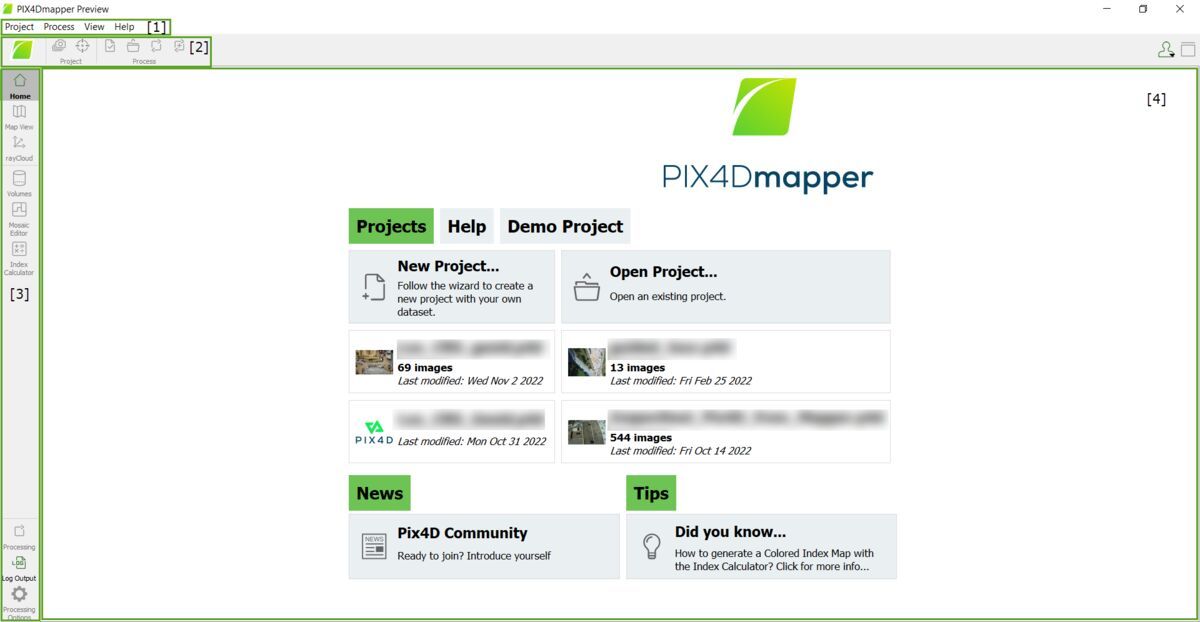
Pix4D is a Swiss photogrammetry software company offering a suite of tools that convert geotagged drone photographs into georeferenced 2D maps, 3D point clouds, and orthomosaics — geometrically corrected aerial images that can be measured like a map. The company's flagship desktop product, Pix4Dmapper, has been an industry standard in professional drone surveying and precision agriculture since the early 2010s. Its core workflow requires planned drone flights with consistent photo overlap, followed by compute-intensive local or cloud processing.
Pix4D is not a single product. It is a portfolio of six tools, each addressing a different vertical: mapping, cloud collaboration, large-scale photogrammetry, rapid field response, agriculture analytics, and survey extraction. Understanding that distinction is essential before purchasing.
Which Pix4D product do you actually need?
Pix4D sells six separate products — Pix4Dmapper, Pix4Dcloud, Pix4Dmatic, Pix4Dreact, Pix4Dfields, and Pix4Dsurvey — each licensed independently, and new users consistently cite product selection as one of the most confusing parts of the buying process. There is no single "Pix4D" license that grants access to the full suite.
Here is what each product targets:
- Pix4Dmapper — Desktop photogrammetry software for surveyors and mapping professionals. The most widely known product.
- Pix4Dcloud — Cloud-based processing and collaboration platform, sold as a subscription separate from Mapper.
- Pix4Dmatic — Designed for large-scale corridor and industrial mapping; intended for high-volume production workflows.
- Pix4Dreact — Positioned for emergency response teams needing faster field maps. Still photo-based.
- Pix4Dfields — Agriculture analytics platform for crop health, NDVI mapping, and yield estimates.
- Pix4Dsurvey — Point cloud processing and feature extraction for licensed surveyors.
The problem for most buyers is that useful real-world workflows cross product boundaries. A surveying team that wants desktop processing, cloud sharing, and point cloud extraction needs Mapper, Cloud, and Survey — three separate licenses. There is no bundle pricing transparency on the public website, and the sales process involves a quote rather than a self-serve checkout for most configurations.
How good is Pix4D accuracy?
Pix4D can achieve survey-grade horizontal accuracy — typically 1-3 cm relative error — when flights are properly planned, photos meet overlap specifications (commonly 80% frontal / 60% side overlap), and ground control points (GCPs) are correctly placed and surveyed. Per ASPRS Positional Accuracy Standards for Digital Geospatial Data, achieving certified survey accuracy requires GCPs established by a licensed surveyor using calibrated equipment.
That qualification matters. Without GCPs, Pix4D relies on drone GPS, which typically produces horizontal accuracy in the 1-5 meter range — not survey grade. With RTK/PPK-enabled drones, GCP dependence decreases, but accuracy still requires proper camera calibration and flight parameters set correctly in Pix4Dmapper. The software does not hide this; Pix4D's own system requirements and accuracy documentation is detailed and honest about what inputs produce what outputs. The issue is that the training curve to understand those inputs is real. Getting survey-grade results from Pix4D is achievable — it just requires expertise and additional equipment that adds to total cost.
How long does Pix4D processing take?
Desktop processing in Pix4Dmapper typically runs 30 minutes to several hours, depending on photo count, hardware, and processing quality settings. A 500-image dataset at full quality on a mid-tier workstation can take 2-4 hours. Larger projects — 2,000 or more images — can run overnight.
Processing time is constrained by local hardware. Pix4D's own documentation recommends a GPU with at least 4 GB of VRAM, 16-32 GB of system RAM, and a multi-core CPU. In practice, teams doing production-volume work invest in dedicated workstations costing $2,000-$5,000 or more. Pix4Dcloud offloads processing to cloud infrastructure, but at a subscription cost of roughly $300-500 per month, it adds significantly to annual operating expense. Neither option is inherently wrong, but the processing time commitment is a real operational consideration for time-sensitive workflows — a drone flight that takes 20 minutes can produce 3-4 hours of compute work before a deliverable is ready.
What does Pix4D actually cost?
A perpetual license for Pix4Dmapper is approximately $4,990. Pix4Dcloud runs roughly $300-500 per month as a subscription. Each additional product — Pix4Dfields, Pix4Dsurvey, Pix4Dreact — carries its own separate license fee.
Total cost of ownership compounds quickly for teams that need more than one product. A surveying firm needing Mapper, Cloud, and Survey — a realistic combination — is looking at the perpetual Mapper cost plus two ongoing subscriptions. Add a capable GPU workstation, initial training time measured in days to weeks per product (Pix4D offers certification courses through the Pix4D Academy), and ongoing support costs, and the three-year total cost can exceed $20,000 for a single operator workflow. For large organizations with dedicated GIS staff and established drone programs, this may represent fair value. For smaller agencies or teams with occasional mapping needs, it is a significant commitment.
Is Pix4D good for emergency response?
Pix4Dreact is marketed as a solution for emergency response teams needing rapid field maps. It processes photos faster than Mapper and is designed for field laptop use. However, it is still a photo-based workflow: operators must plan and fly a grid mission, collect hundreds of overlapping still images, then process them. In a true emergency response scenario — an active incident, a structure fire, a multicar crash with a closed freeway — this workflow introduces meaningful latency between scene arrival and usable deliverable.
Photo-based photogrammetry also requires clear airspace for a planned grid flight, which is not always available at complex incidents. The workflow does not accept video input from body-worn cameras, smartphones, 360-degree cameras, or dashcam footage. For incident commanders who need a fast orientation map within minutes of arrival, video-based alternatives process footage captured during a single orbit flight rather than a multi-pass grid, which reduces both flight time and processing time. Pix4D has no public safety compliance certifications — no CJIS compliance, no FedRAMP authorization — which limits its use in evidence workflows that require chain-of-custody controls or data residency guarantees.
Pix4D Pros and Cons
| Pros | Cons |
|---|---|
| Survey-grade accuracy (1-3 cm) with proper GCP setup | Six separate products, each licensed independently |
| Detailed accuracy documentation and quality reports | Perpetual Mapper license approximately $4,990 plus subscription add-ons |
| Strong GCP support and camera calibration pipeline | Desktop processing requires a $2,000-$5,000+ workstation |
| Deep CAD/GIS export compatibility | Processing takes 30 minutes to overnight depending on hardware |
| Established industry standard trusted by surveyors worldwide | Steep learning curve — certification courses measured in days/weeks |
| Active academic and research community | No video input, no smartphone/body camera support |
| Pix4Dfields delivers real agronomic value for precision agriculture | No CJIS or FedRAMP compliance for public safety use |
What do users say about Pix4D?
Pix4D maintains a strong reputation among professional surveyors and GIS specialists, with high marks on G2 and consistent recommendations in academic and research settings. Users who invest the time to learn the software and configure flights properly report outputs that meet or exceed survey-grade requirements.
The most common frustration is the product fragmentation. Users on forums and review platforms regularly describe the experience of discovering that the workflow they need spans two or three separately licensed products. The lack of transparent bundle pricing forces buyers into sales negotiations before they can budget accurately.
Processing time and hardware requirements draw consistent feedback as well. Teams without dedicated workstations report that large datasets can monopolize a machine for hours, and the Pix4Dcloud subscription — while solving the hardware problem — adds meaningful ongoing cost.
Who should use Pix4D?
Pix4D is a well-matched tool for organizations with specific, established needs:
- Professional surveyors who need survey-grade photogrammetry outputs with full GCP control and export compatibility with CAD and GIS workflows.
- Precision agriculture operators where Pix4Dfields provides NDVI, crop health indices, and variable rate application maps that have direct agronomic value.
- Large infrastructure and construction programs with dedicated GIS staff, established drone flight operations, and hardware already in place.
- Academic and research institutions where processing time is acceptable and accuracy verification is a priority.
Pix4D is a less natural fit for public safety agencies, first responders, or small teams that need fast turnaround without significant upfront investment in hardware, training, or software licensing. The six-product structure and total cost of ownership are also friction points for organizations that need one capable tool rather than a specialized suite.
Alternatives Worth Considering
Agisoft Metashape is a closer desktop photogrammetry alternative to Mapper, with lower per-seat pricing and strong accuracy outputs. It appeals to research and academic users in particular.
DroneDeploy offers cloud-based photogrammetry with faster turnaround than local Mapper processing and a simpler UI, though it lacks Pix4D's depth on accuracy configuration.
SkyeBrowse is a videogrammetry platform — a workflow that derives 3D models and 2D maps from drone video rather than collections of still photographs. This distinction matters for time-critical scenarios: a single orbit video captured in minutes can produce a 3D model or 2D orthomosaic without grid flight planning, photo overlap calculations, or GCP placement. SkyeBrowse delivers survey-grade accuracy down to 0.1 inch on Public Safety & Enterprise with no GCPs required. It is trusted by 1,200+ public safety agencies including San Bernardino County Fire, Utah State Fire Marshal's Office, and the California Department of Justice. It targets public safety agencies (law enforcement, fire, accident reconstruction) and operates on AWS GovCloud infrastructure with CJIS compliance and chain of custody on Public Safety & Enterprise, a compliance profile Pix4D does not offer. For organizations whose primary use cases involve incident documentation rather than precision surveying, the workflow difference is material.
WebODM is an open-source photogrammetry option for teams with technical staff who can manage their own infrastructure and want to avoid per-seat licensing costs.
Frequently Asked Questions
Is Pix4D worth the cost?
For professional surveyors and large infrastructure programs with established drone operations and GIS staff, Pix4D delivers accuracy and export quality that justifies the investment. For smaller teams or agencies with occasional mapping needs, the combined cost of software licensing, hardware, and training can be difficult to justify against alternatives with simpler pricing.
Which Pix4D product should I buy?
That depends on your workflow. Pix4Dmapper handles desktop photogrammetry for most mapping and survey tasks. Pix4Dcloud adds cloud processing and collaboration. Pix4Dsurvey handles point cloud extraction. Many real-world workflows require two or three products, and there is no transparent bundle pricing on the public website.
How accurate is Pix4D?
With properly placed ground control points, calibrated cameras, and correct flight parameters (80% frontal / 60% side overlap), Pix4D can achieve 1-3 cm horizontal accuracy. Without GCPs, accuracy drops to 1-5 meters using drone GPS alone.
Can Pix4D be used for emergency response?
Pix4Dreact is marketed for rapid field mapping, but it still requires a photo-based grid flight workflow. It does not accept video input and has no CJIS compliance or FedRAMP authorization. For time-critical incidents requiring sub-hour turnaround or compliance-sensitive documentation, purpose-built alternatives may be more appropriate.
Does Pix4D process video?
No. All Pix4D products require geotagged still photographs as input. Video files from drones, smartphones, body cameras, or action cameras cannot be processed.
Pix4D is a mature, capable photogrammetry platform with a well-earned reputation in professional surveying and agriculture. The software does what it claims when configured correctly. The honest limitations are structural: six products, compounding licensing costs, hardware-dependent processing times, and a workflow that requires flight planning and expertise that not every team has. For the right organization with the right resources, it is a strong investment. For everyone else, it is worth understanding exactly which product you need — and what the realistic total cost looks like — before committing.
Upload your first video free. Create a free SkyeBrowse account, upload a drone video, and get a 3D model processed in the cloud. Freemium organizations that have never had a paid plan can get their first full Commercial model for $5 (normally $24.99), with every Pro tool and export included and 90-day storage.