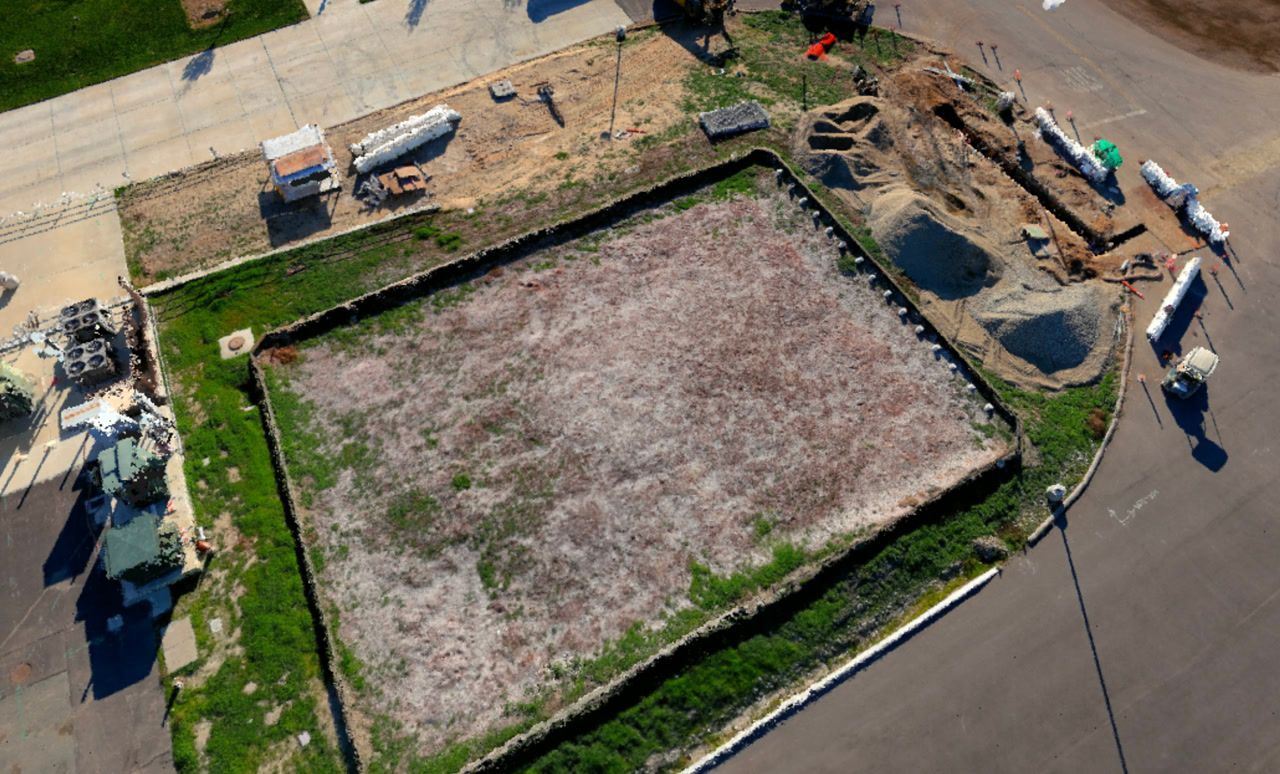
Orthomosaics flatten complex construction sites into measurable 2D maps, but generating them has traditionally meant specialized software, overnight processing, and hardware that only specialists can operate. The right orthomosaic software for construction eliminates those delays so site measurements inform same-day decisions.
Contents
- Processing Speed vs Image Quality Tradeoffs
- Desktop Software vs Cloud Platforms
- GeoTIFF Export and GIS Compatibility
- Ground Sample Distance and Measurement Confidence
- Licensing Models and Per-Project Costs
- Related Articles
Contents:
- Processing speed vs image quality tradeoffs
- Desktop software vs cloud platforms
- GeoTIFF export and GIS compatibility
- Ground sample distance and measurement confidence
- Licensing models and per-project costs
- Get a SkyeBrowse quote
Processing Speed vs Image Quality Tradeoffs
Orthomosaic generation works by stitching overlapping images into a single georeferenced map. Desktop software like Pix4D and Agisoft Metashape delivers high resolution but demands powerful GPUs and hours of processing. Cloud platforms offload compute but often queue jobs during peak times, adding unpredictability. The question is whether you need perfection or whether "good enough to measure confidently" arrives fast enough to matter.
Desktop Software vs Cloud Platforms
| Software | Processing Location | Typical Turnaround | Hardware Requirements |
|---|---|---|---|
| Pix4Dmapper | Local workstation | 2-6 hours depending on dataset size | High-end GPU, 32GB+ RAM |
| Agisoft Metashape | Local workstation | 3-8 hours for detailed projects | Workstation-class CPU and GPU |
| DroneDeploy | Cloud processing | 30 minutes to 2 hours (queue dependent) | Lightweight local machine, internet required |
| Propeller Aero | Cloud processing | 1-3 hours with upload time | Any device with browser access |
| SkyeBrowse | Cloud processing | ~1:1 video-to-processing ratio (90 seconds of video = 90 seconds of processing) | Universal Upload accepts any video source |
Desktop software gives control but ties output speed to workstation specs. Teams with high-end rigs get results faster, but operators who travel or work from site offices face bottlenecks. Cloud platforms remove hardware constraints but introduce dependency on upload bandwidth and service availability.
GeoTIFF Export and GIS Compatibility
Construction teams use orthomosaics for cut-fill calculations, site layout verification, and volumetric tracking. That requires georeferenced outputs—usually GeoTIFF format—that overlay cleanly onto CAD drawings or import into ArcGIS and QGIS without coordinate translation. Desktop software provides full control over coordinate systems and projection settings. Cloud platforms typically automate georeferencing based on GPS metadata but may require manual adjustment if the source video lacks precise telemetry.
SkyeBrowse outputs GeoTIFF orthomosaics alongside LAZ point clouds and GLB 3D models, so teams get both the flat map view and the elevation data in a single processing run. That dual output eliminates the need to run separate workflows for 2D and 3D deliverables.
Ground Sample Distance and Measurement Confidence
Ground sample distance (GSD) determines how much real-world area each pixel represents. Lower GSD means finer detail and more confident measurements. Typical drone flights at 100 feet altitude generate 1-2 inch GSD, which suffices for site overviews but struggles with smaller features. SkyeBrowse Premium delivers 8K orthomosaics with sub-inch detail when captured at appropriate distances, and Premium Advanced pushes resolution to 16K for scenarios where measurement precision drives approvals or warranty compliance.
Measuring stockpiles, grading accuracy, or as-built dimensions requires knowing the measurement tolerance. If the spec allows ±3 inches, then 1-2 inch GSD provides margin. If tolerances tighten to ±0.5 inches, then sub-inch resolution becomes necessary. Match your software tier to the tightest tolerance you need to defend.
Licensing Models and Per-Project Costs
Desktop software typically charges annual licenses ($3,500-$8,500 per seat for professional tiers) plus hardware amortization. Cloud platforms offer subscription pricing ($200-$500 per month) with per-project upload limits or pay-as-you-go credits. The breakeven depends on project volume. High-frequency users favor subscriptions. Occasional users prefer pay-per-use.
SkyeBrowse pricing scales per capture, so sporadic projects stay economical and high-volume users can predict costs based on actual usage rather than seat counts. A single operator capturing a site in 10 minutes with a consumer drone generates an orthomosaic for roughly $25, compared to the $360 cost of fielding a four-person survey crew for 3 hours. That per-capture model aligns cost with value rather than locking teams into fixed overhead.
Operational efficiency: reduce recapture trips by reviewing orthomosaics while still on site. SkyeBrowse's fast processing lets superintendents verify coverage during the site visit, so missed areas get addressed immediately instead of requiring return trips. That simple habit cuts rework and keeps schedules tight.
Get a SkyeBrowse Quote
Georeferenced orthomosaics inform construction decisions only when processing delivers results matching project timelines—same-day measurements supporting contractor coordination, change order verification, and progress billing approval. Whether your workflow requires cut-fill calculations for earthwork verification, site layout confirmation against construction documents, volumetric tracking for materials management, or as-built documentation feeding into CAD and GIS systems, SkyeBrowse processes video into GeoTIFF orthomosaics in approximately 1:1 ratio (90-second site orbit generates measurements in ~90 seconds) eliminating multi-hour processing delays that desktop photogrammetry and queued cloud services impose.
Construction superintendents capture sites in 10 minutes using consumer drones or smartphones—generating orthomosaics and 3D models for approximately $25 processing cost. Compare to traditional survey crew deployment consuming 3 hours at $360 cost (4-person crew, equipment amortization, mobilization)—video-based workflows reduce per-capture costs by 93% while delivering results same-day rather than waiting for survey crew availability and post-processing completion. This efficiency enables frequent documentation matching construction velocity—weekly earthwork verification, biweekly progress monitoring, milestone completion confirmation—rather than limiting orthomosaic generation to monthly intervals justified under traditional economics.