# Introducing 360 Interior Mapping
> Use SkyeBrowse 360 mapping to convert 360 camera video into 3D models in minutes. No Matterport specialist needed. Works with any 360 camera.
Source: https://www.skyebrowse.com/news/posts/introducing-360-interior-mapping
Published: 2024-06-03
**New 360 camera mapping and multiple interior mapping upgrades!**
 Hi SkyeBrowsers,
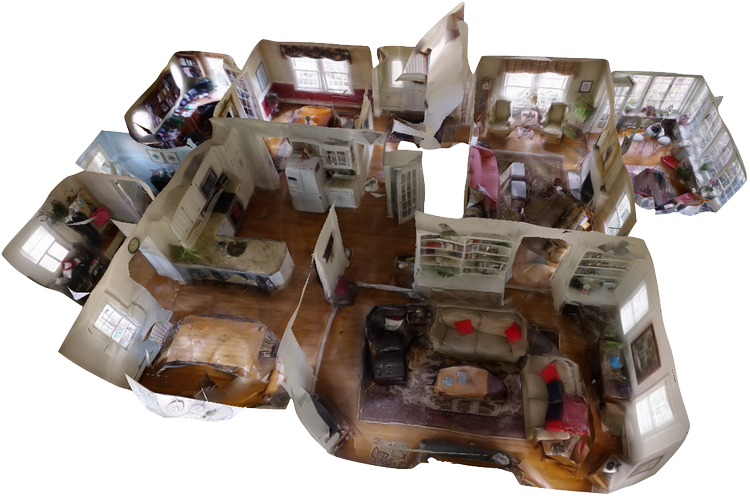
We're excited to release 360 mapping for interior and exterior spaces! With our latest release, you can turn any 360 video into a 3D model. We're also announcing incredible updates to our interior mapping. Now **DJI Avata** 3D models turn out better than ever. You can also upload **body cam footage** into SkyeBrowse for a quick 3D model.
Read more to find out how!
---
## Introducing 360 Mapping
Hi SkyeBrowsers,
We're excited to release 360 mapping for interior and exterior spaces! With our latest release, you can turn any 360 video into a 3D model. We're also announcing incredible updates to our interior mapping. Now **DJI Avata** 3D models turn out better than ever. You can also upload **body cam footage** into SkyeBrowse for a quick 3D model.
Read more to find out how!
---
## Introducing 360 Mapping
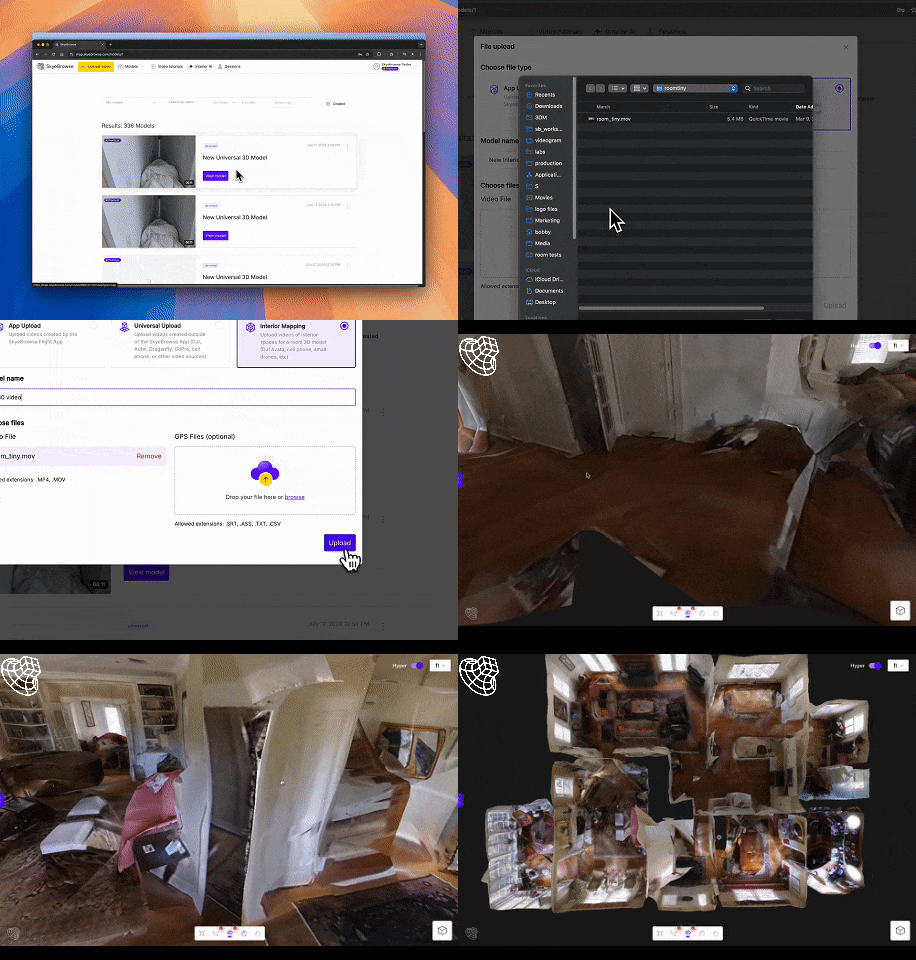 After months of testing, we're proud to announce that all users can make 360 3D models in minutes. There's no need to hire a dedicated Matterport specialist to make 3D models. Here's how it works:
1. Record a video with the 360 camera above your head
2. Upload the 360 video into SkyeBrowse
3. Choose interior mapping
After a few minutes, you'll receive an email with your 3D model!
After months of testing, we're proud to announce that all users can make 360 3D models in minutes. There's no need to hire a dedicated Matterport specialist to make 3D models. Here's how it works:
1. Record a video with the 360 camera above your head
2. Upload the 360 video into SkyeBrowse
3. Choose interior mapping
After a few minutes, you'll receive an email with your 3D model!
---
## New Interior Mapping Upgrades
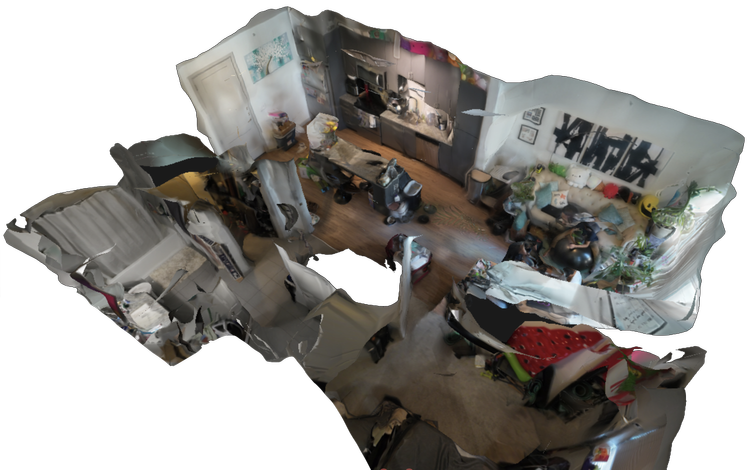 We're always improving our interior mapping. In the latest release, walls and objects from a DJI Avata video look better. We've heard from our early adopters that our interior 3D models look significantly better. It's crazy that interior mapping released just 5 months ago and now we're averaging 3 interior crime scenes a day.
Back by popular demand, we now accept body cam footage into interior mapping! Walk around an area of interest and get a 3D model back in minutes.
Try it out today by making some 3D models!
We're always improving our interior mapping. In the latest release, walls and objects from a DJI Avata video look better. We've heard from our early adopters that our interior 3D models look significantly better. It's crazy that interior mapping released just 5 months ago and now we're averaging 3 interior crime scenes a day.
Back by popular demand, we now accept body cam footage into interior mapping! Walk around an area of interest and get a 3D model back in minutes.
Try it out today by making some 3D models!
Need help figuring out how to start? Check out our [Tutorials](https://www.skyebrowse.com/tutorials) to learn more about best practices with SkyeBrowse.
---

 After months of testing, we're proud to announce that all users can make 360 3D models in minutes. There's no need to hire a dedicated Matterport specialist to make 3D models. Here's how it works:
1. Record a video with the 360 camera above your head
2. Upload the 360 video into SkyeBrowse
3. Choose interior mapping
After a few minutes, you'll receive an email with your 3D model!
After months of testing, we're proud to announce that all users can make 360 3D models in minutes. There's no need to hire a dedicated Matterport specialist to make 3D models. Here's how it works:
1. Record a video with the 360 camera above your head
2. Upload the 360 video into SkyeBrowse
3. Choose interior mapping
After a few minutes, you'll receive an email with your 3D model!
 We're always improving our interior mapping. In the latest release, walls and objects from a DJI Avata video look better. We've heard from our early adopters that our interior 3D models look significantly better. It's crazy that interior mapping released just 5 months ago and now we're averaging 3 interior crime scenes a day.
Back by popular demand, we now accept body cam footage into interior mapping! Walk around an area of interest and get a 3D model back in minutes.
Try it out today by making some 3D models!
We're always improving our interior mapping. In the latest release, walls and objects from a DJI Avata video look better. We've heard from our early adopters that our interior 3D models look significantly better. It's crazy that interior mapping released just 5 months ago and now we're averaging 3 interior crime scenes a day.
Back by popular demand, we now accept body cam footage into interior mapping! Walk around an area of interest and get a 3D model back in minutes.
Try it out today by making some 3D models!